


What matters to a business owner
- 01AI assistants get more useful: a new Copilot chat (public preview) and more AI agents that handle repetitive work such as matching purchase orders and checking expenses.
- 02Online selling gets smoother: better Shopify handling for orders, returns, exchanges, and business-to-business (B2B) pricing.
- 03Reports get easier to design and brand.
- 04One old connection method is being switched off: if any of your tools talk to Business Central through "SOAP" web services on Microsoft pages, they will stop working in version 29. Check this first.
- 05Microsoft schedules your update, so test before it lands, not after.
What is Business Central 2026 release wave 2?
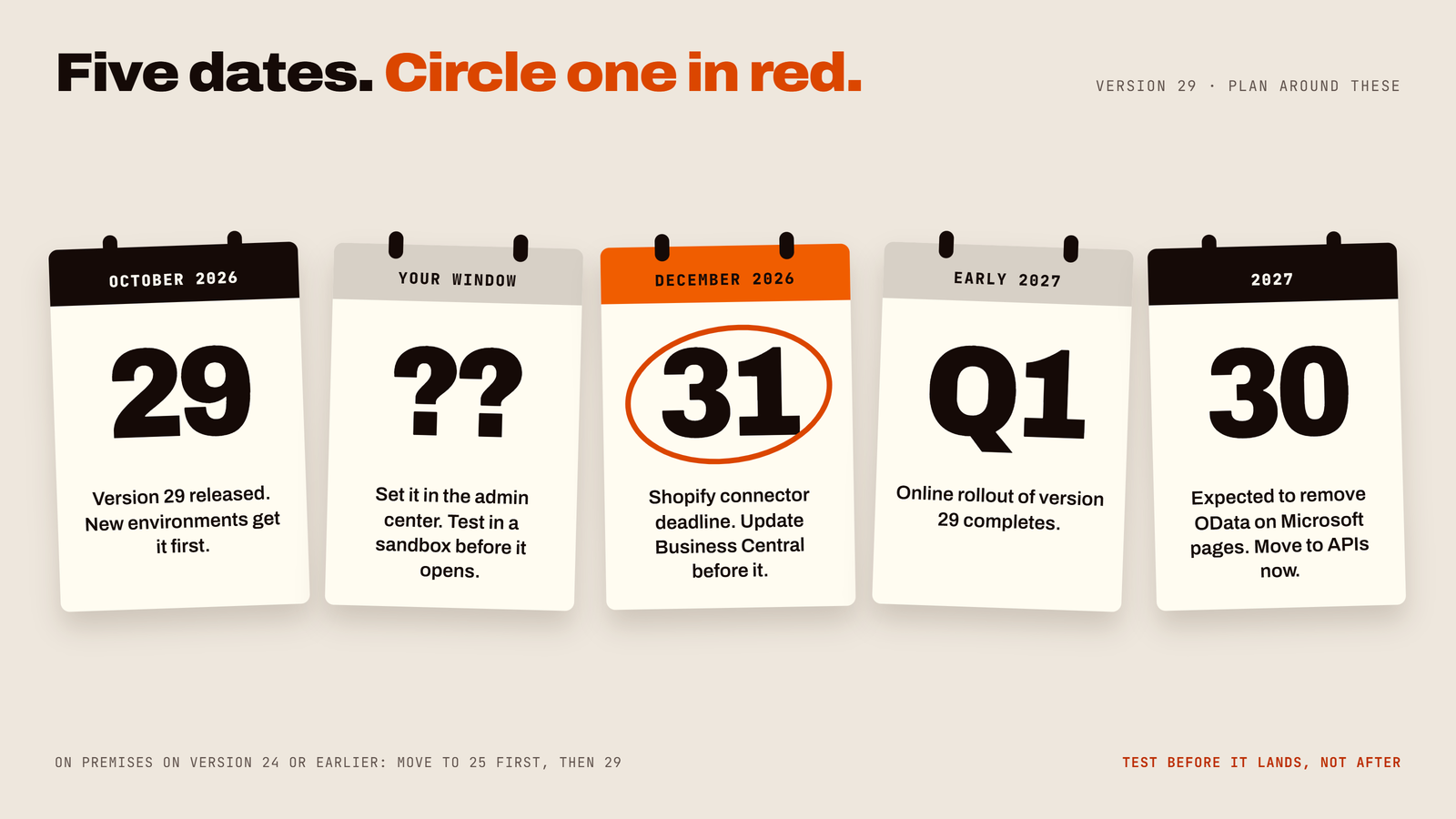
Microsoft ships two major Business Central updates every year. Wave 2 is version 29.0, released in October 2026. Think of it as the autumn service for your business engine.
- 01Online customers are updated automatically inside an update window your administrator can set in the Business Central admin center. The online rollout continues into early 2027.
- 02On-premises customers choose when to upgrade. If you are on version 24 or earlier, you must first move to version 25, then to 29. Versions 25 to 28 can go directly.
- 03Not every feature arrives on day one. Some are fully available, others are in preview. We flag which is which below.
Plain-English translation: the update is coming either way. The only question is whether you meet it prepared or surprised.
What's actually new in Business Central 29 (and why you should care)
1. Smarter AI: Copilot chat and agents
- 01Copilot chat (public preview). Ask questions in everyday language and get answers about your business data. It respects each person's permissions, and its interaction with Business Central data is read-only, so asking a question will not create, change, or delete records. Reaching Microsoft 365 work data may need a separate Microsoft 365 Copilot license.
- 02Payables Agent improvements. Better matching of purchase order lines to supplier invoices: fewer hours of "does this invoice match that order?"
- 03Expense Agent growth. Policy checks, approvals, and mileage rates that can vary by date range and vehicle type.
- 04Agent control. One place to see tasks from all agents, easier permission management, and the ability to review AI-generated content right on the page where you work.
- 05Data queries for AI tools. The MCP Server lets compatible AI tools query Business Central data without custom APIs.
Reality check: "Preview" means test it first. Microsoft describes this preview as production-ready, but read the preview terms and pilot it with a small team before relying on it.
2. Shopify and B2B: fewer manual fixes, more selling
If you sell online, version 29 improves how Shopify connects to Business Central:
- 01Better handling of order changes, exchanges, and refunds
- 02Support for B2B companies, catalogs, and customer-specific pricing
- 03Help preventing conflicting prices from syncing
- 04An updated, more secure connection to Shopify's newer API
Important date: the Shopify connector released in April 2026 relies on an API version supported only until December 31, 2026. Update Business Central before then to keep the integration running.
3. Reporting that looks like you
Document reports (invoices, quotes, statements) get a better design experience through the updated Word add-in: themes, headers and footers, and the ability to hide empty sections. Translation: invoices that look like your brand, not like a spreadsheet having an identity crisis.
Everyday users also get recently used values in lookups and recently searched items in Tell Me, so nobody has to hunt for the same customer 40 times a day.
4. Dataverse mapping: connect with your other Microsoft apps
You can now map additional Dataverse fields in Business Central (generally available in 29.0). This can reduce custom integration work if you also use Dynamics 365 Sales, Power Apps, or Power Automate. It is not magic: mapping rules, data ownership, and error handling still need careful setup.
5. Service Management and sustainability
Service Management (service items, service orders, contracts, warranty, resources, and service billing) is part of the Business Central Premium experience, not Essentials. Version 29 extends carbon (CO2e) data into more areas of Business Central, including service processes, helping teams that report on sustainability.
What Business Central already does well (not new, but why people choose it)
To keep this honest, here is what is not new in version 29 but is the reason companies pick Business Central:
- 01Quote-to-cash in one system: quotes, orders, stock checks, shipping, invoicing, payments, and financial reporting connected together
- 02Service tracking (Premium): service items, orders, contracts, and billing linked to inventory and finance
- 03Automation with Power Automate: approvals, notifications, and data movement
The benefit is one version of the truth from the sales desk to the warehouse to accounting, whether you are a 5-person shop or a 500-person distributor.
Business Central vs. Dynamics 365 Sales vs. Customer Service: which do you need?
If your main need is...
- 01Quotes, stock, shipping, invoicing, and accounting in one place: Business Central.
- 02Lead tracking, deal stages, sales forecasting, relationship management: Dynamics 365 Sales (often paired with Business Central).
- 03Support cases, queues, knowledge base, multichannel customer support: Dynamics 365 Customer Service.
- 04Servicing equipment, repairs, and contracts tied to billing and parts: Business Central Service Management (Premium).
Choose by the work you do, not by the word "service" in the product name.
The one change that can break things: SOAP is being removed
In plain English: some reports, apps, and connectors reach Business Central through an older method called SOAP on Microsoft's own pages. Version 29 removes that ability. Anything still depending on it will stop working.
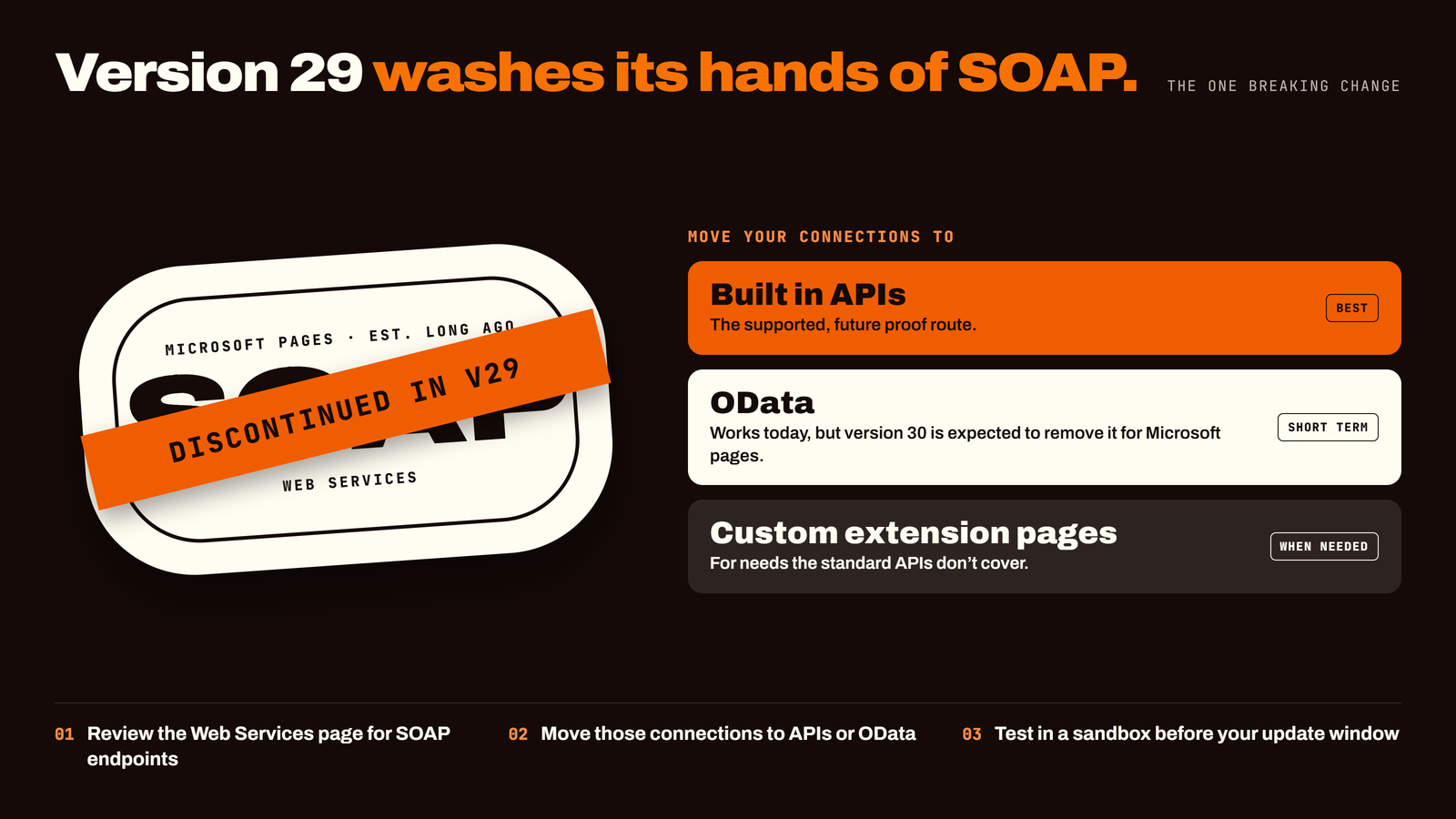
What to do:
- 01Ask your IT team or Business Central partner to review the Web Services page for SOAP endpoints.
- 02Move those connections to built-in APIs or OData (or custom extension pages).
- 03Test in a sandbox before your update window.
Heads-up for 2027: version 30 is expected to remove OData access to Microsoft-authored pages, so move to the supported APIs now and avoid doing this migration twice.
Your 10-step version 29 readiness checklist
- 01Confirm your version, deployment type, licenses, and update window in the admin center.
- 02List everything connected: extensions, custom reports, integrations, Dataverse mappings, Shopify, Power Automate flows.
- 03Check for SOAP endpoints and plan the replacement.
- 04Create a sandbox copy and run the update there first.
- 05Test your sales flow: Customer, Quote, Order, Shipment, Invoice, Payment, including returns, credit memos, stock shortages, and pricing.
- 06Test your service flow (Premium): Customer, Service Item, Service Order, Parts and Labor, Completion, Invoice, including contracts and warranty.
- 07Test Shopify and Dataverse sync: errors, permissions, and reconciliation.
- 08Pilot AI features separately and review the preview terms.
- 09Clean your data: duplicate customers and messy item records hurt automation and AI equally.
- 10Train users, plan rollback where applicable, and monitor closely after go-live.
Honest limitations (because trust is good business)
- 01AI is only as good as your data and permissions. Garbage in, shiny garbage out.
- 02Preview features can change before they are final.
- 03Integrations need an owner. Mapping fields is easy; maintaining them is the real job.
- 04Premium-only features cannot be assumed for Essentials users.
Frequently asked questions
- 01When is Business Central 2026 release wave 2 released? Version 29.0 is the October 2026 major release. New environments get it first, and existing online environments are updated in their scheduled window, with the online rollout continuing into early 2027.
- 02Will the update break my integrations? Possibly, if they rely on SOAP endpoints for Microsoft pages. Most standard integrations continue to work, which is why sandbox testing matters.
- 03Is Copilot in Business Central safe to use? Copilot chat respects user permissions and is read-only for Business Central data. It is a public preview, so pilot it first and review the terms.
- 04Does Business Central Essentials include Service Management? No. Service Management requires the Premium experience.
- 05Do I need Dynamics 365 Sales if I have Business Central? Only if you need advanced pipeline management, forecasting, and relationship tools. Many distributors run well on Business Central alone.
- 06Can small businesses benefit from version 29? Yes. Smaller teams often gain the most from automating repetitive work like invoice matching and expense checks.
- 07Does version 29 affect my Shopify store connection? If you use the Shopify connector, update before December 31, 2026 so it stays on a supported Shopify API version.
Don't leave your update to chance
The businesses that get the most from every release share two habits: they test first, and they work with a partner who knows where the weak spots are. In a free Business Central 29 Readiness Review, we'll check your integrations for SOAP and other upgrade risks, review your update window and Shopify deadline, and identify quick wins from AI agents and reporting for your business.
Book a consultation