


Advanced warehouse management in Business Central gives every item a place, guides your team to the right shelf and keeps your system in step with what is physically in the building. It helps most when you have many items, many locations or a growing team. Set up well, it means fewer picking errors, faster shipping and stock numbers you can trust. Set up badly, it creates extra steps with no payoff. This guide helps you tell the difference.
Does your warehouse feel like this?
- 01Your system says the item is in stock, but nobody can find it.
- 02Pickers walk the same aisles again and again because orders are not organized.
- 03The wrong item or quantity goes out, and the customer calls.
- 04Stock counts are always off, and counting takes days.
- 05New staff need weeks to learn where everything lives, because it all lives in someone's head.
These problems appear in businesses of every size and industry, from a distributor with one warehouse to a manufacturer with several. They are not caused by careless people. They happen when a growing operation outgrows simple stock tracking.
What is advanced warehouse management in Business Central?
Business Central can track stock at a simple level: how many units of an item you have at a location. Advanced warehouse management goes further. It tracks exactly where each item sits inside the warehouse, and it tells your team what to do next.
Think of the difference between knowing "we have 200 boxes in the building" and knowing "120 are in aisle 3, shelf B, and 80 are in the overflow area, and here is the route to pick them." The second is what advanced warehousing delivers.
In Business Central this is usually called directed put-away and pick. "Directed" means the system tells your team where to store goods and where to pick them from, instead of leaving it to memory.
Two flows, one warehouse
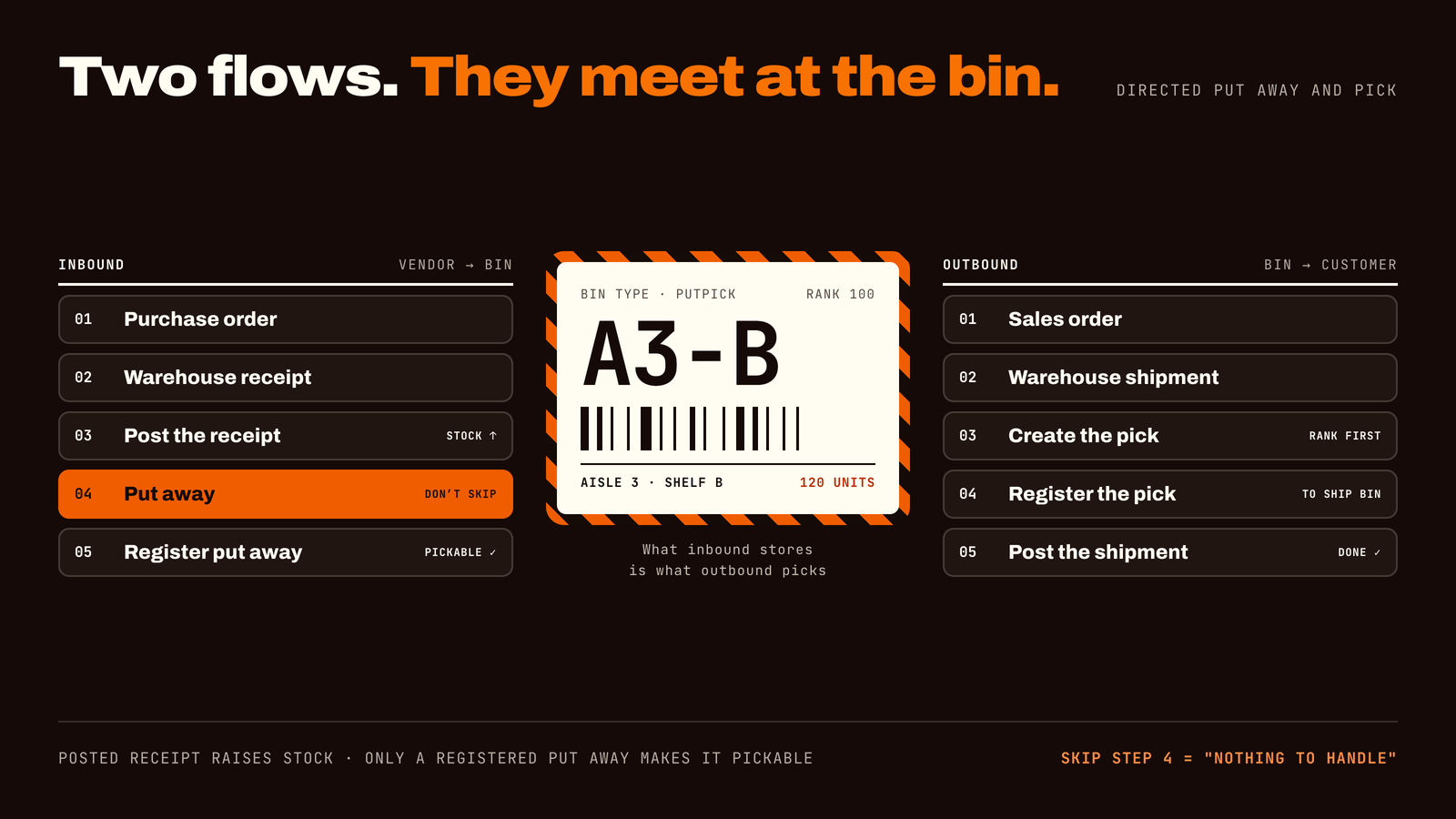
A warehouse has two main flows. The purchase side (inbound) brings goods in. The sales side (outbound) sends goods out. Each has its own documents and its own steps. They meet in the middle at the bins: what the purchase side stores is what the sales side picks.
The purchase side (inbound): from vendor to bin
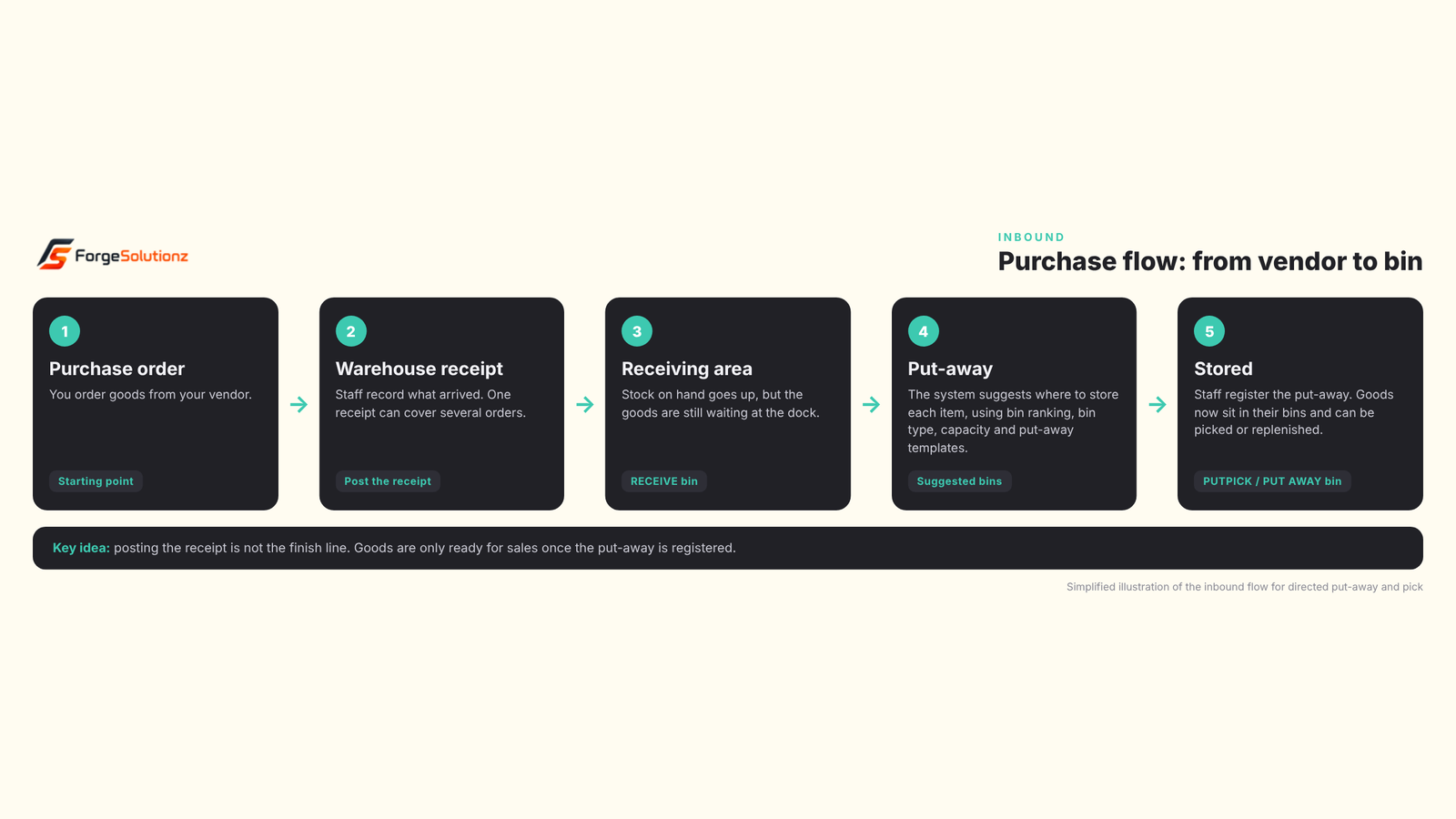
- 01Purchase order. You order goods from your vendor. This is the starting point.
- 02Warehouse receipt. When the goods arrive, staff record what was received. One receipt can cover several purchase orders at once.
- 03Post the receipt. Your stock on hand goes up. At this point the goods are still waiting in the receiving area, in a RECEIVE bin. They are in the building, but not yet ready to pick.
- 04Put-away. The system suggests where each item should be stored. It looks at bin ranking, bin type, capacity and your put-away templates, which are simple rules such as "prefer a bin that already holds this item."
- 05Register the put-away. Staff move the goods into the suggested bins and register it. Now the stock sits in storage and can be picked, or moved to a picking area later.
What goes wrong here: if the put-away is skipped, your system shows stock on hand, but nothing is pickable. This is behind the common "Nothing to handle" message when someone tries to create a pick.
The sales side (outbound): from order to customer
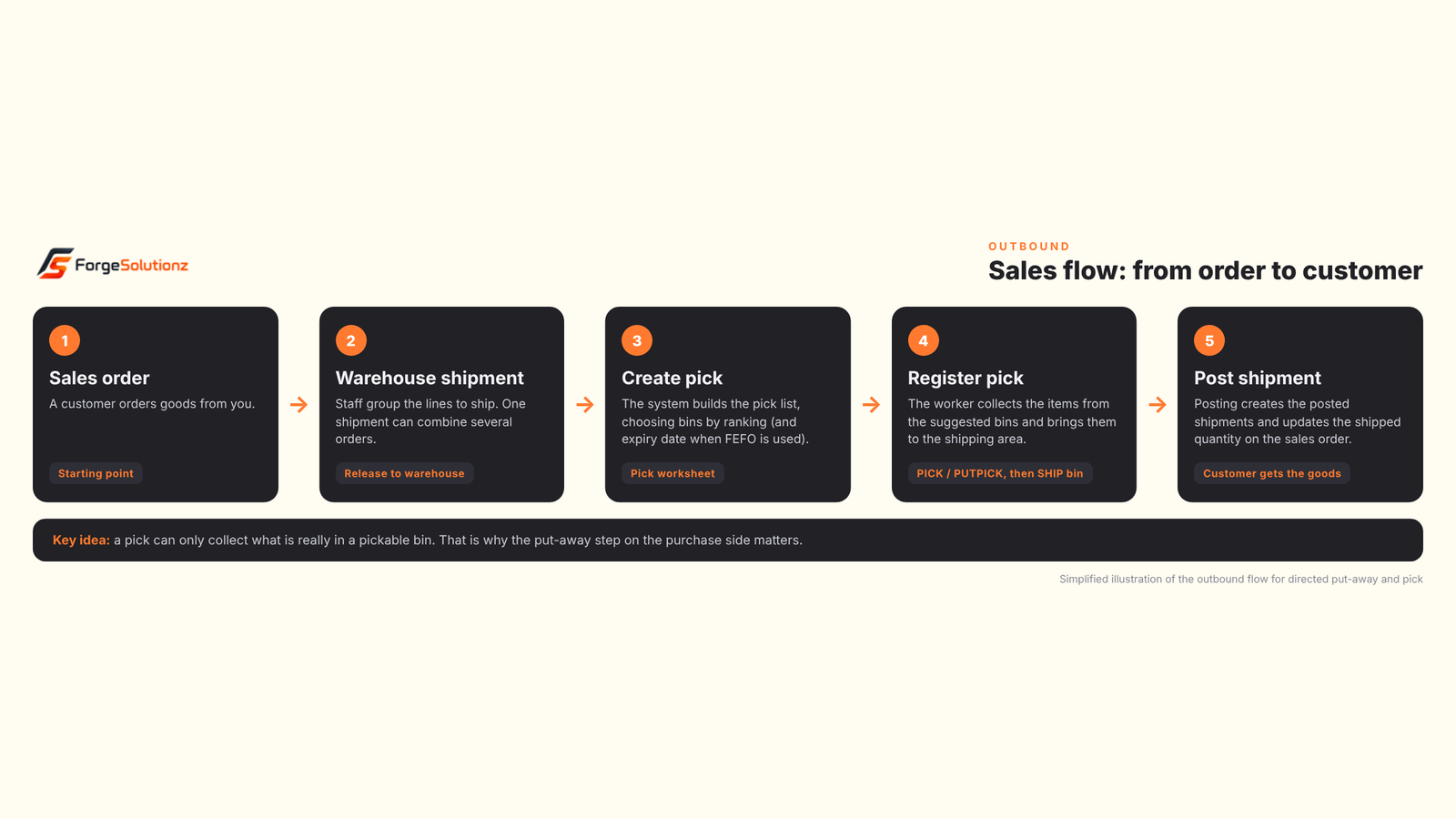
- 01Sales order. A customer orders goods from you. This is the starting point.
- 02Warehouse shipment. Staff group the order lines to be shipped. One shipment can combine several sales orders.
- 03Create the pick. The system builds a pick list and decides which bins to take stock from. It follows bin ranking and, if you use expiry dates, can pick the earliest-expiring stock first.
- 04Register the pick. The worker collects the items from the suggested bins. Picked goods wait in the shipping area, in a SHIP bin, until the shipment is posted.
- 05Post the shipment. Posting creates the posted warehouse shipment and the posted sales shipment, and updates the shipped quantity on the sales order. Anything not shipped stays in inventory.
What goes wrong here: a pick can only collect stock that is really sitting in a pickable bin. If the order quantity is higher than what is available there, the pick will be smaller than the order. Clear reservation and shipment rules help your team avoid surprises.
Zones and bins, defined
Zones and bins are what make advanced warehousing work, so it helps to define them clearly.
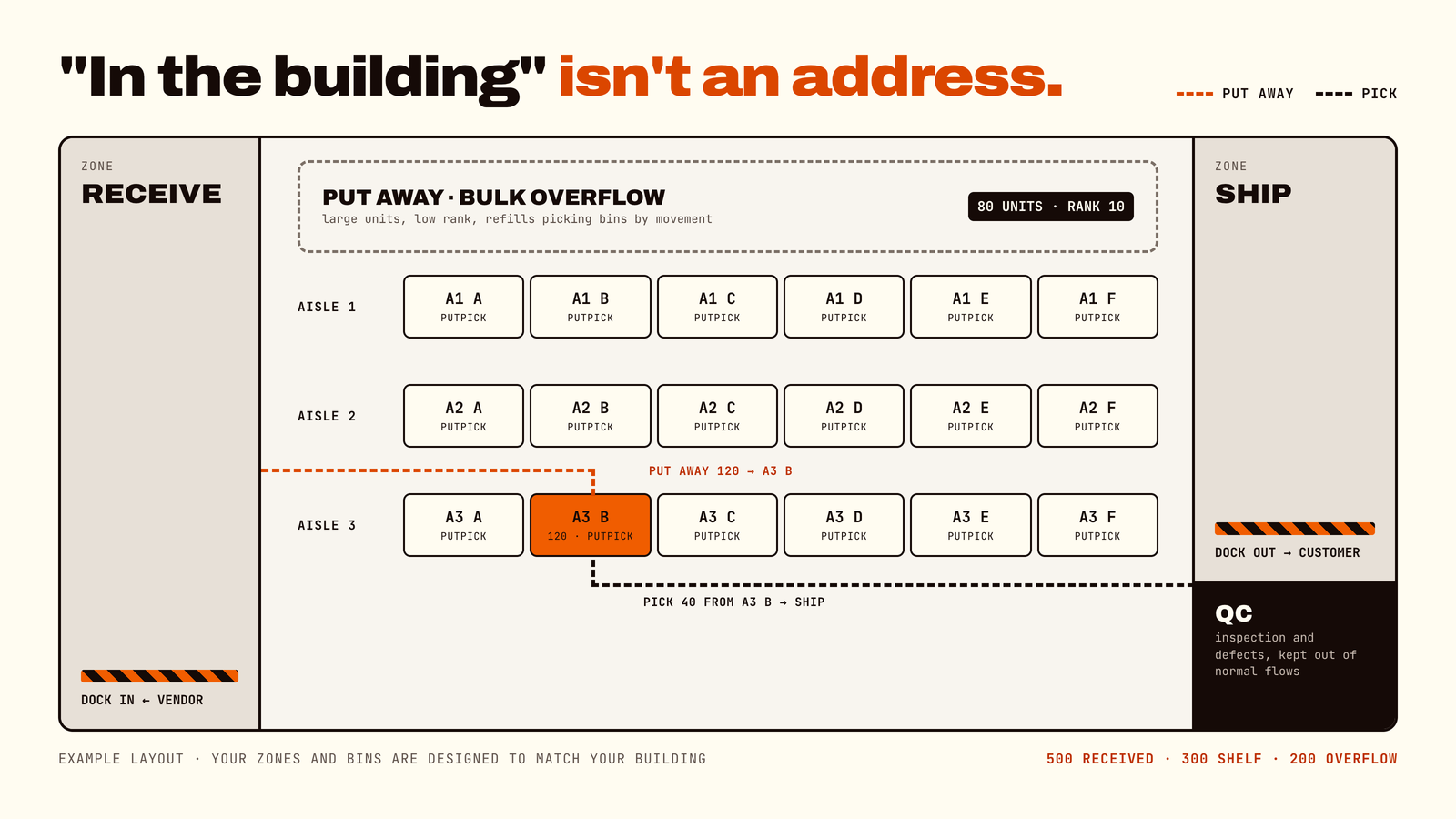
- 01Location: a warehouse or site that holds stock. Advanced warehousing is switched on for a location, and bins become mandatory there.
- 02Zone: a group of bins that share a purpose, such as receiving, bulk storage, picking or shipping. Settings you give a zone carry over to the bins created in it, which saves setup time.
- 03Bin: the smallest storage unit, such as one shelf or rack slot. Every item sits in a named bin.
The six bin types
A bin type tells the system what a bin is used for. Business Central has six.
- 01RECEIVE: holds goods that were received but not yet put away.
- 02PUT AWAY: bulk storage for large units that are not picked from directly. Usually given a low rank, and refilled into picking bins.
- 03PICK: used only for picking. Usually given a high rank, so it is suggested first.
- 04PUTPICK: used for both put-away and picking. Typical for everyday stock.
- 05SHIP: holds picked goods that have not yet been posted as shipped.
- 06QC: holds items for inspection, defects or inventory adjustments. These items stay out of the normal flows.
Many warehouses start with just four: RECEIVE, PUTPICK, SHIP and QC. That is enough to get useful suggestions and keep the setup simple. Bin types guide the system's suggestions, and staff can still override them when real life needs it.
The rules that keep it tidy
- 01Bin ranking: a number that decides which bins are suggested first. Put-aways favor higher-ranked bins, and picks take from the highest-ranked stock first.
- 02Fixed, dedicated and default bins: a fixed bin keeps an item assigned to it, even when empty. A dedicated bin is reserved for a particular use. A default bin is suggested first for put-away and picking.
- 03Capacity limits: a bin can be limited by quantity, volume or weight, so the system does not overfill it.
- 04Warehouse classes: labels such as frozen or hazardous on items and bins, so goods only go where they are allowed.
- 05Put-away templates: a prioritized list of rules for choosing where goods are stored.
- 06Movements: moves of stock between bins inside the warehouse. For example, refilling a picking bin from bulk storage when it runs low.
Depending on your setup, Business Central also supports ideas such as grouping several orders into one picking round (often called wave picking) and sending incoming goods straight to outgoing orders (cross-docking). Your consultant can tell you which of these fit your operation.
A simple example
A company receives 500 units of a popular item on Monday. Without advanced warehousing, the units are "in stock," but a worker still has to decide where to put them and remember where they went. By Thursday, three people have placed them in three places.
With advanced warehousing, the system directs the team to put 300 units in the main shelf and 200 in overflow. When an order for 40 units arrives, the pick tells the worker exactly which bin to go to. When the main shelf runs low, a movement refills it from overflow. At the end of the month, counting is quick because every bin is clearly defined.
What your business gains
- 01Fewer picking mistakes. Workers are told what to pick and where, so wrong items and quantities drop.
- 02Faster order fulfillment. Less searching and walking means orders leave the building sooner.
- 03Stock you can trust. Your system matches what is physically on the shelves, so promises to customers are realistic.
- 04Easier training. The system holds the knowledge, not one experienced person's memory.
- 05Quicker, more accurate counts. Counting by bin is easier than counting a whole building at once.
- 06Room to grow. Add more items, shelves, staff or locations without losing control.
- 07Better visibility. Managers can see what is received, stored and waiting to ship.
Do you actually need it? An honest answer
You probably do if you hold many different items, have more than one storage area or location, struggle with picking errors or lost stock, or plan to grow your warehouse team.
You may not need it if you have a small, simple stock room, few items and one or two people who know exactly where everything is. In that case, a lighter warehouse setup in Business Central can be a better fit, because advanced warehousing adds steps your team has to follow.
The right choice depends on your operation, not on which option sounds more powerful. A good partner will tell you honestly if the simpler route is enough.
Common mistakes to avoid
- 01Switching it on without redesigning the warehouse. Bins and zones should match how goods really flow through your building.
- 02Skipping the put-away step. Stock stays in the receiving area and cannot be picked.
- 03Too many bins and rules. Over-complicated setups slow your team down. Start simple and refine.
- 04Not training the team. The system only works if people follow the steps every time.
- 05Ignoring how it connects to sales. Orders, reservations and shipments should behave the way your business expects. Where standard behavior does not fit, a small, targeted customization can close the gap.
- 06No testing before go-live. Run real scenarios in a safe test environment first.
How to get started
- 01Map your real warehouse. Walk the floor and draw how goods arrive, are stored, picked and shipped.
- 02Decide your zones and bins. Keep the first design simple and logical.
- 03Set up locations and rules. Put-away rules, bin contents and employees.
- 04Test with real orders. Receive, put away, pick and ship in a test environment.
- 05Train and go live. Start with a small area if you can, then expand.
- 06Review after a few weeks. Adjust bins and rules based on what your team experiences.
Frequently asked questions
- 01What is advanced warehouse management in Business Central? It is a warehouse setup (often called directed put-away and pick) where the system tracks the exact bin of every item and tells workers where to store and pick goods.
- 02What is the difference between basic and advanced warehousing? Basic setups track stock by location and use simpler receiving, put-away, pick and shipping steps. Advanced setups add zones, bins and rules that direct each task to a specific place.
- 03Why can't I create a pick even though I have stock on hand? In advanced warehousing, stock must be put away into a pickable bin first. Posting the receipt raises your stock on hand, but the goods are not pickable until the put-away is registered.
- 04What is the difference between a zone and a bin? A bin is one exact storage spot, such as a shelf slot. A zone is a group of bins with a shared purpose, such as receiving or shipping.
- 05Which bin types do I need to start? Many warehouses begin with RECEIVE, PUTPICK, SHIP and QC bins. You can add PUT AWAY and PICK bins later if you need bulk storage or dedicated picking areas.
- 06Is advanced warehousing only for large companies? No. It suits any business with enough items, locations or staff that simple tracking no longer keeps up, whatever its size or industry.
- 07Will it slow my team down? It adds structure, so there are more defined steps. When designed well, those steps save far more time than they cost. Poor design is what causes slowdowns.
- 08Can it be tailored to how we work? Yes. Standard behavior can be refined with configuration, and where needed, small customizations. A consultant can advise which fits your process.
- 09Does it need special licensing? Licensing depends on your Business Central plan. Your partner can confirm what applies to you.
Your 2-minute readiness check
If you tick two or more, advanced warehouse management deserves a closer look:
- 01Stock on screen often does not match the shelf
- 02Pickers waste time searching or walking back and forth
- 03Wrong items or quantities regularly reach customers
- 04Stock counts take days or never quite match
- 05Your warehouse is growing, or you plan to add locations or staff
Make your warehouse tell the truth.
ForgeSolutionz's Business Central specialists will look at how goods flow through your warehouse today, tell you honestly whether advanced or basic warehousing fits you better, point out the quick wins such as bin design and put-away rules, and give you a clear, jargon-free plan and timeline. No obligation — you'll leave with a clear picture of what a better warehouse flow could look like, even if you never work with us.
Book a consultation