01 — Challenge
The challenge: the answer exists, but it is hard to find
Business Central records every sale. The problem is where the information sits. To learn what one customer bought and at what price, someone has to open old invoices or shipments, or search ledger entries and filter them by customer. This is slow, so it often does not happen. Teams end up:
- 01Quoting from memory, or from whatever the last person remembers.
- 02Asking colleagues, "Do you know what we charged them last time?"
- 03Keeping price notes in spreadsheets that nobody updates.
- 04Quoting different prices to the same customer on different days, and then explaining the difference.
None of this is carelessness. The team simply has no fast way to see the history they need at the exact moment they need it.
Why this matters for any business: any company with repeat customers faces this, whether it sells ten products or ten thousand. Customers remember what they paid. If a new quote comes in higher with no explanation, trust suffers. If it comes in lower than it needed to be, margin is quietly lost. Either way, a missing piece of history costs money or goodwill.
02 — Goal
The goal: make a customer's history one glance away
The brief was simple. Put the customer's buying history where the sales team already looks, and keep it close when they are creating something new. In plain terms:
- 01See, on the customer card, the items sold to that customer.
- 02See the prices that were charged for them.
- 03Review that same history when creating future quotes and orders.
- 04Avoid opening old documents or running ledger searches to find it.
03 — Solution
The solution: sold items, right on the customer card
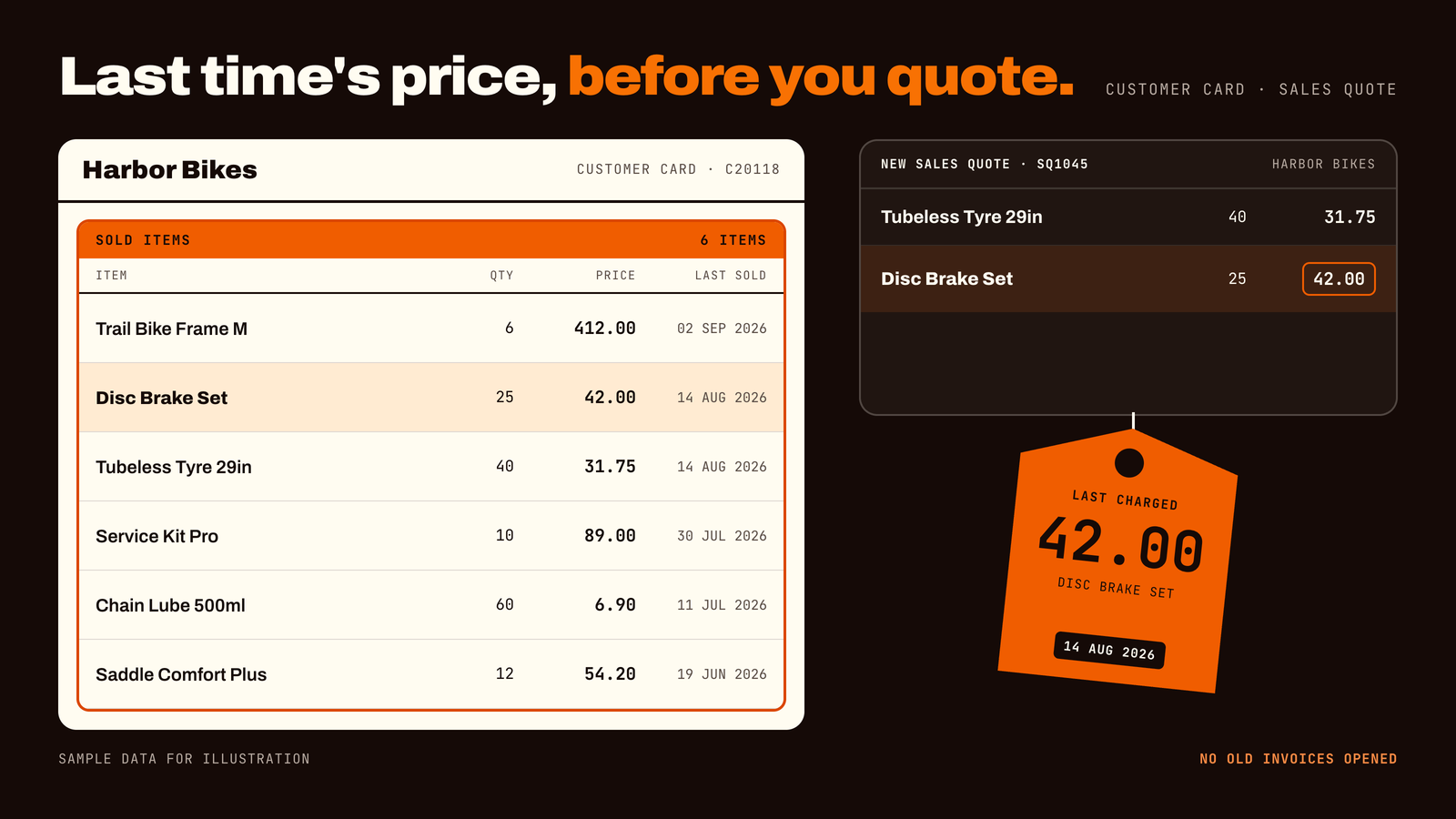
ForgeSolutionz added a list of sold items to the customer card in Business Central. For each customer, it shows the items that were sold to them, along with the prices. The same history can also be reviewed while a sales team member is creating a future quote or order, so the answer to "what did we charge last time?" is on hand when the decision is made.
04 — Before/after
A day in the life: before and after
Before. A long-standing customer emails asking for a quote on products they have bought before. The salesperson opens recent invoices, looks for the right lines, copies a few prices into a note and hopes nothing was missed. If the customer bought last year, it is even harder to trace.
After. The salesperson opens the customer card and sees the items already sold to that customer, with prices. While creating the quote, the same history is available to review. The quote goes out in minutes, and the prices are consistent with what the customer expects.
05 — What changes
What changes for your team
01One list of what each customer has bought
The customer card now shows the items sold to that customer, so nobody has to rebuild the history from separate documents.
02Prices shown next to the items
Seeing the price next to each item makes it easy to stay consistent, or to explain a change on purpose when a price needs to move.
03History available when it is needed
When creating future quotes and orders, the team can review what was sold before. The information is in front of them at the moment they decide.
04Less dependence on memory and side spreadsheets
The history lives in Business Central, attached to the customer. New team members get the same view as experienced ones.
In practice: a salesperson is covering for a colleague who is on leave. She has never dealt with this customer, but the customer card tells her what they buy and what they paid. She can quote with confidence.
06 — Before/after
Before and after at a glance
- 01Finding what a customer bought. Before: open old invoices or search ledger entries. After: open the customer card.
- 02Checking the last price. Before: ask a colleague or trust memory. After: see it next to the item.
- 03Preparing a repeat quote. Before: copy numbers from several places. After: review the history while creating the quote.
- 04Price consistency. Before: depends on who remembers. After: everyone sees the same history.
- 05Onboarding new sales staff. Before: they learn customers over months. After: the history is on the card from day one.
07 — Results
The results
Real client numbers for this engagement will be added here once a full reporting cycle is complete. The measures we're tracking: quote preparation time for repeat customers, the rate of price corrections or customer queries after quoting, time spent searching old documents each week, and how quickly new sales staff can quote independently.
08 — Who benefits
Who benefits from this?
- 01Sales representatives and inside sales teams who prepare quotes and orders every day
- 02Sales managers who want consistent pricing across the team
- 03Customer service staff who answer "what did we sell them?" calls
- 04Business owners who want customer relationships to survive staff changes
09 — Takeaways
Key takeaways
- 01The data is usually already in Business Central. The gap is how fast the team can see it.
- 02Customers remember what they paid. Your team should be able to see it too.
- 03The best place for history is where people already work: the customer card and the quote.
- 04Small, targeted changes to familiar screens are easier to adopt than new tools.
10 — FAQ
Common questions
- 01Where does the list of sold items come from? It comes from your existing sales data in Business Central. Nothing needs to be typed in again.
- 02Can the team see it while creating a quote or order? Yes. The history can be reviewed while creating future quotes and orders, so the team does not have to leave what they are doing.
- 03Does my team need to learn a new system? No. They keep using the customer card and the quote and order screens they already know.
- 04Is this only for large sales teams? No. Even a one-person sales desk benefits from not having to rely on memory for what each customer paid.
- 05Can it be adapted to our needs? Yes. Your consultants can tailor what is shown and how it is arranged to the way your team works. An initial review can scope this.
- 06How long does it take to set up? It depends on how much you want to customize. An initial review can give you a clear plan and timeline.
11 — Check
Could your sales team use the same shortcut? A 2-minute check
If you tick two or more, this enhancement will likely pay for itself:
- 01Salespeople ask each other what a customer paid last time
- 02Repeat quotes take longer than they should
- 03The same customer sometimes gets different prices for the same item
- 04New sales staff take months to learn the customer base
- 05Price history lives in spreadsheets or in people's heads