Never Re-Key an Online Order Again: How Order Sync Bridge Keeps Every WooCommerce Order Traceable in Business Central
Online orders are only half the story. The other half is what happens inside your accounting system once the order arrives. When the web order's identity gets lost on the way, support teams dig through screens to find which payment belongs to which order. ForgeSolutionz built Order Sync Bridge for Business Central to fix that: it stamps the WooCommerce order details on every document and journal line it touches, so each order stays one traceable thread, from checkout to the ledger.
01 — Challenge
The challenge: orders arrive, but the trail goes cold
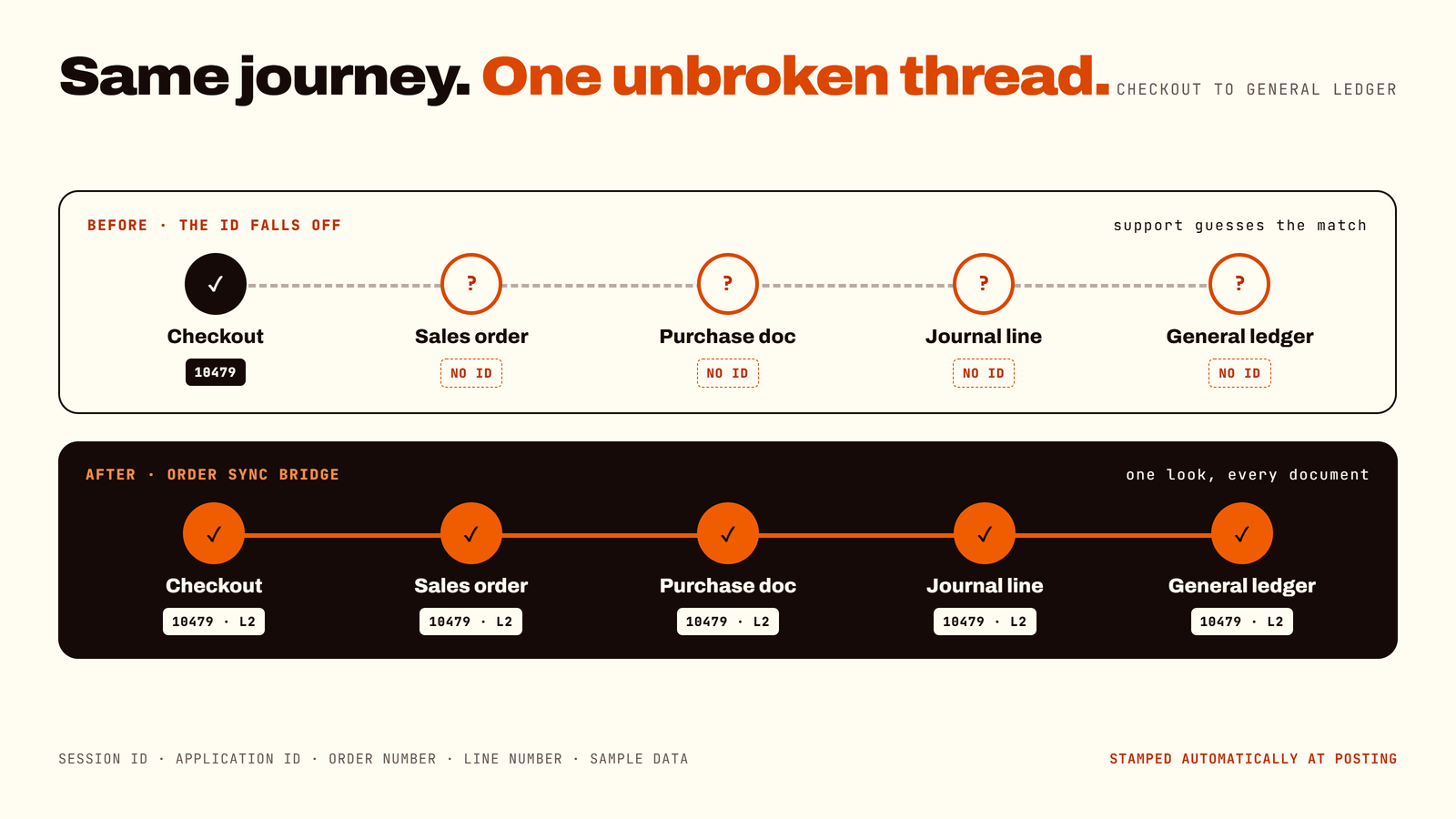
Picture a customer emailing: "I paid for my order three days ago, where is it?" Your support agent opens Business Central. They find a payment. They find a sales order. They think they are related. They are fairly sure. They open a third screen to check, and then a fourth, and somewhere around screen five they begin to question their life choices.
The root cause is simple. Orders placed on a WooCommerce store do arrive in Business Central, but the web order's identity does not travel with them through every document. Once an order touches a sales order, a purchase order or a journal line, the link back to the original web order can disappear. Every manual re-entry adds one more chance for a typo to break it.
This is a common story with disconnected systems. One integration guide lists the usual symptoms: manual order re-entry and reconciliation, delayed fulfilment and invoicing, and limited visibility across the order lifecycle. Another notes that manually matching transactions with payments is error-prone and time-consuming, and becomes unsustainable as a business grows.
01Support could not trace a payment to a web order without digging through several screens.
02Staff copied order details from one place to another by hand.
03Each manual entry was another place where a typo could break the link.
04Reconciling web orders with accounting took more time than it should.
02 — Why it matters
Why this matters for any business
You do not need to be a big online retailer to feel this. If you take orders on a website and run your books in Business Central, you have the same gap, whether you ship ten orders a day or ten thousand. Small teams lose hours to detective work. Larger teams lose that time at scale, plus the patience of their support and finance staff. The size changes the volume, not the shape.
There is also a trust angle. A clear, traceable trail from an order to the ledger is what makes audits calmer and customer conversations shorter. Integration providers consistently point to a transparent financial trail as one of the benefits of connecting sales and accounting.
03 — Goal
The goal: one order, one traceable thread
01Keep the web order's identity attached to everything it touches in Business Central.
02Do it automatically, so nobody has to remember.
03Make a payment traceable back to its web order in one look.
04Remove copy-and-paste from the process.
04 — Solution
The solution: Order Sync Bridge for WooCommerce
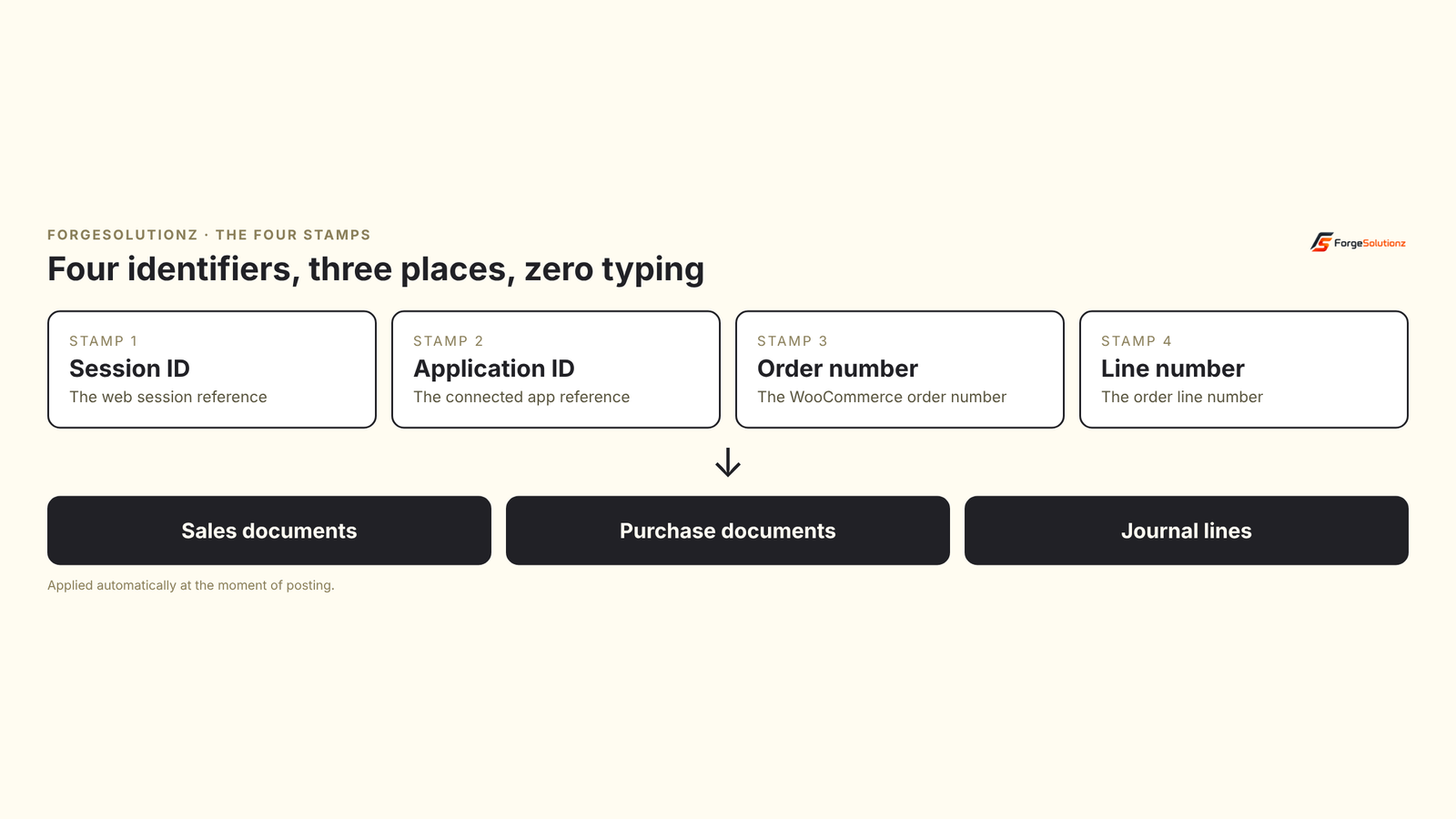
Order Sync Bridge adds four identifiers from the web order to every sales document, purchase document and journal line it touches, automatically, at the moment of posting. Those identifiers are the WooCommerce session ID, the application ID, the order number and the line number.
Four identifiers go onto three kinds of records. The stamping happens automatically when documents post.
“Think of it as a luggage tag for orders. The suitcase can change planes, and the tag still tells you whose it is and where it came from.”
05 — Before/after
A day in the life: before and after
Before. A customer asks about a payment. Support opens the payment, then searches for the sales order, then checks a purchase document, then a journal line, comparing amounts and dates to guess the match. Eventually someone is fairly sure.
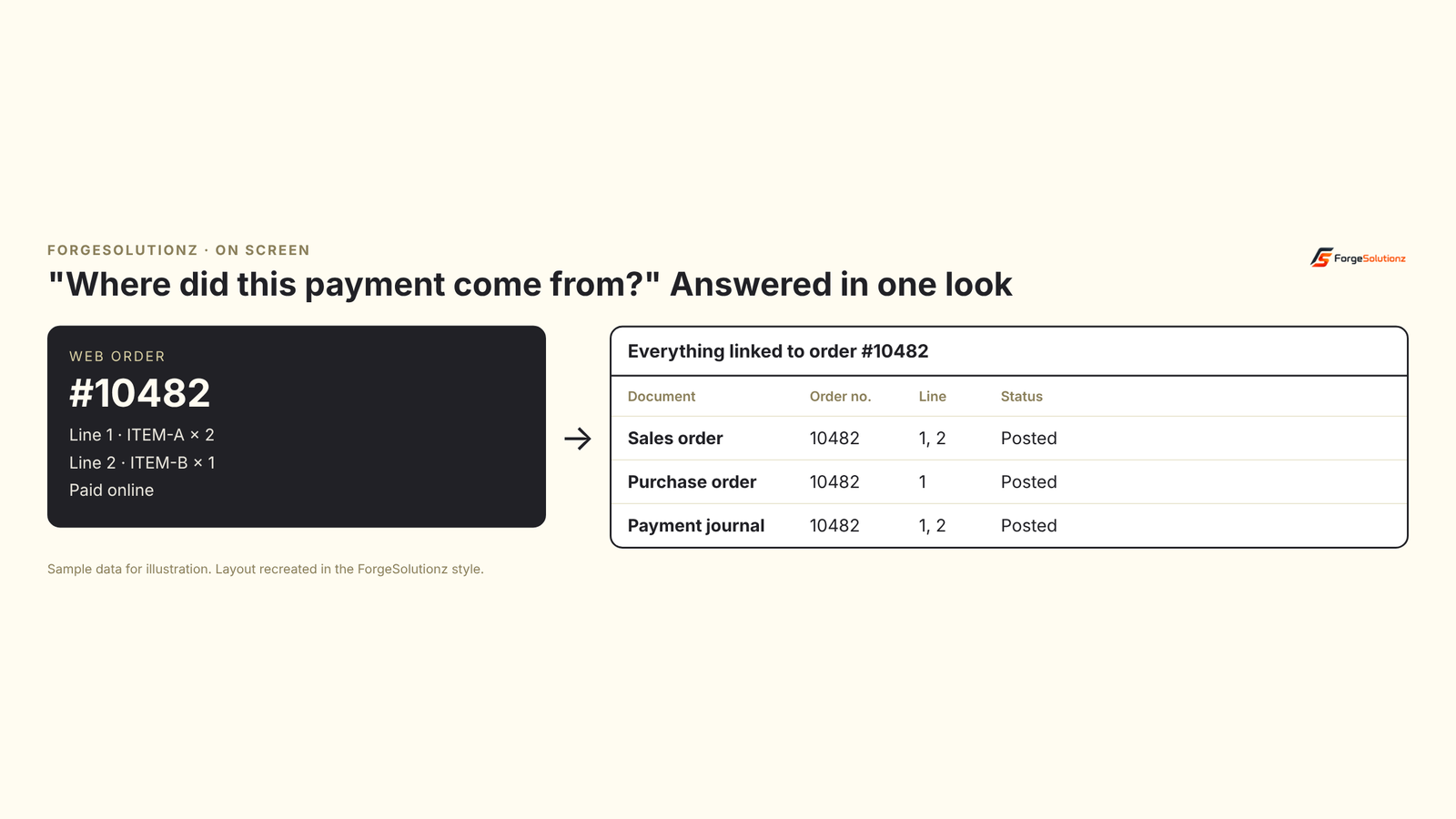
After. Support searches the web order number and sees every sales document, purchase document and journal line linked to it, line by line. The answer takes one look, and nobody has to be "fairly sure".
One web order number brings up everything linked to it. Sample data for illustration.
06 — Capabilities
Four capabilities that make the difference
01
Four identifiers, stamped on every record
Session ID, application ID, order number and line number go onto sales documents, purchase documents and journal lines. Between them, they identify not just the order, but the exact line of it.
02
Automatic, at the moment of posting
Nobody has to remember a step. The stamping happens as documents are posted, so the trail is complete by design, not by discipline.
03
Line-level traceability
Because the line number travels too, you can trace a single product line, not just the whole order. That matters for partial shipments, returns and questions about one item.
04
One thread from checkout to the general ledger
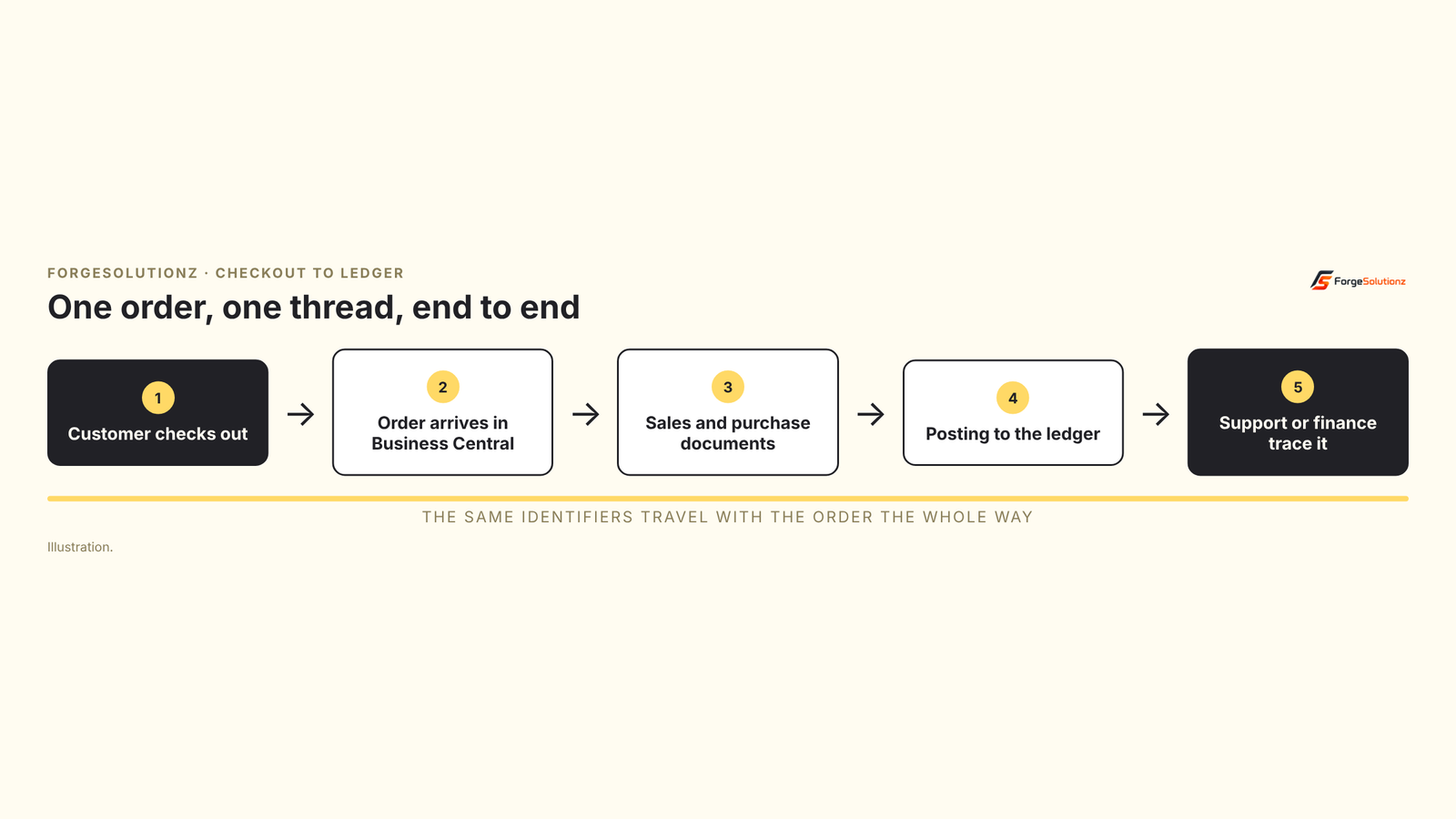
The same references travel the whole way, from the web order to the posted entries. Finance and support are looking at the same story, in the same language.
The same identifiers follow the order from checkout to the ledger, so anyone can trace it at the end.
07 — Who benefits
Who benefits
01eCommerce brands on WooCommerce who want their web store and accounting to tell the same story.
02Business Central administrators who reconcile web orders with accounting.
03Support teams who need to answer "where is my order and payment?" quickly.
04Operations teams who are done with copy-and-paste.
08 — Results
The results
Real client numbers for this engagement will be added here once a full reporting cycle is complete. The measures we're tracking: time to trace a payment to its web order, hours spent re-keying order data per week, reconciliation time at month-end, and support tickets about "where is my order/payment".
09 — FAQ
Frequently asked questions
01What does Order Sync Bridge do? It stamps the WooCommerce session ID, application ID, order number and line number on every sales document, purchase document and journal line it touches, so each web order can be traced end to end.
02Do my staff need to do anything? No. The stamping happens automatically at the moment of posting.
03Can I trace one product line, not just the whole order? Yes. The line number is stamped too, so you can follow a single line through the documents.
04Is this only for large online stores? No. Any business taking orders on WooCommerce and accounting in Business Central can use it, whatever the order volume.
05Does it help with reconciliation? Yes. When each document carries the web order's identity, matching payments to orders becomes a lookup instead of a hunt.
06Can it be adapted to our setup? Yes. Which documents are stamped, and how the references are shown, can be shaped around how your team works.
10 — Check
Two-minute traceability check
Tick what is true for your business today:
01We take orders on a WooCommerce store.
02Tracing a payment to a web order takes more than a minute.
03Someone re-types or copies order details into Business Central.
04Support has to open several screens to answer one order question.
05Reconciling web orders is a manual job at month-end.
11 — Takeaways
Key takeaways
01Orders arriving in Business Central is not the same as orders being traceable.
02Manual re-entry is where the link to the web order usually breaks.
03Stamping the web order's identity on every record keeps one thread from checkout to ledger.
04Automatic stamping at posting means nobody has to remember.
05Line-level references make partial shipments and returns easier to follow.
Want a result like this one?
Thirty minutes with a senior engineer. Bring the system you are stuck on and leave with a written summary of your options.