Never Post a Deal You Didn't Know Was Underwater: How Live Margin Guardrails Protect Profit Before the Quote Goes Out
A salesperson discounts a line to win a deal. Nothing on the screen shows what that does to profit, so the quote goes out. Weeks later, finance finds the order in a report, when it is too late to change anything. ForgeSolutionz built a customization for Business Central that puts cost, commission and gross profit % right next to the price, turns the line red when margin falls below a set threshold, and lets a team hold one target margin across a whole order with a single field.
01 — Challenge
The challenge: the margin was invisible at the moment it mattered
Every sales team knows the pattern. A customer pushes back on price, the rep offers a discount, and the deal closes. The problem is timing. The information that would have changed the decision, the margin, only appears after the invoice is posted. In practice that meant:
01Reps typed discounts without seeing what they did to gross profit.
02Unprofitable orders slipped through because nobody on that screen could spot them.
03Finance found the problem weeks later in a report, when the deal was already done.
04Commission was worked out by hand in a side spreadsheet that never quite matched the books.
None of this was bad judgment. People were making decisions with half the picture.
Why this matters for any business: any company that quotes, discounts or pays commission faces the same risk, whether it sells equipment, parts, services or supplies, and whether it has two reps or fifty. A few thin-margin deals can quietly wipe out the profit from many good ones. The earlier the margin is visible, the cheaper it is to fix.
02 — Goal
The goal: see the margin before you send the quote
Leadership set a clear brief. Margin should be visible to the person making the decision, at the moment they make it. In plain terms:
01Show cost, commission and gross profit next to the unit price.
02Warn the rep right away when a line drops below the acceptable margin.
03Make it easy to hold one target margin across an entire order.
04Keep the margin data all the way through to the posted invoice.
03 — Solution
The solution: live margin guardrails on every line
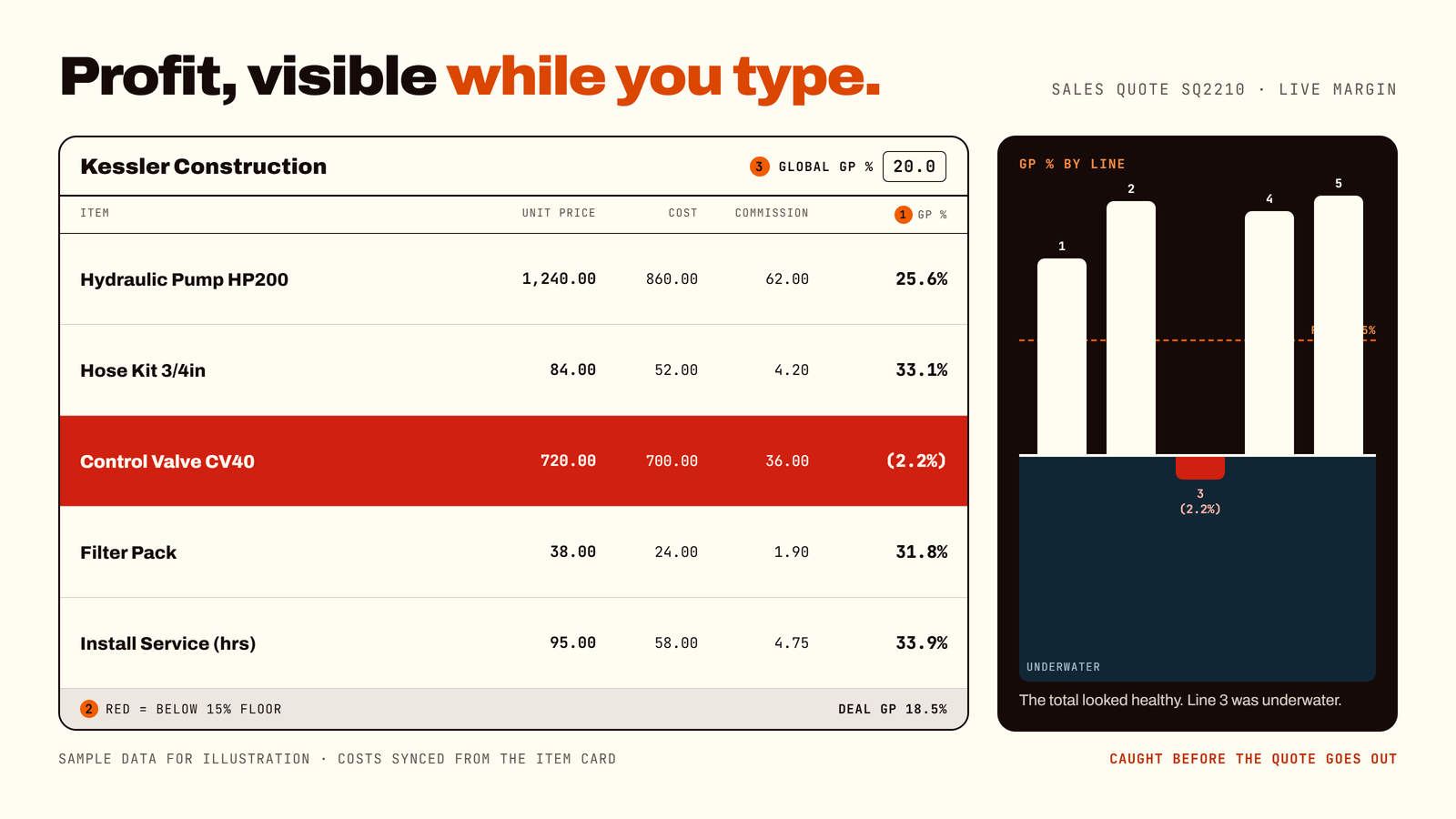
ForgeSolutionz added margin visibility directly to the quote and order lines in Business Central. Each line now shows its standard cost, its commission cost and its gross profit percentage, live, right beside the unit price. When the gross profit falls below your threshold, the line turns red.
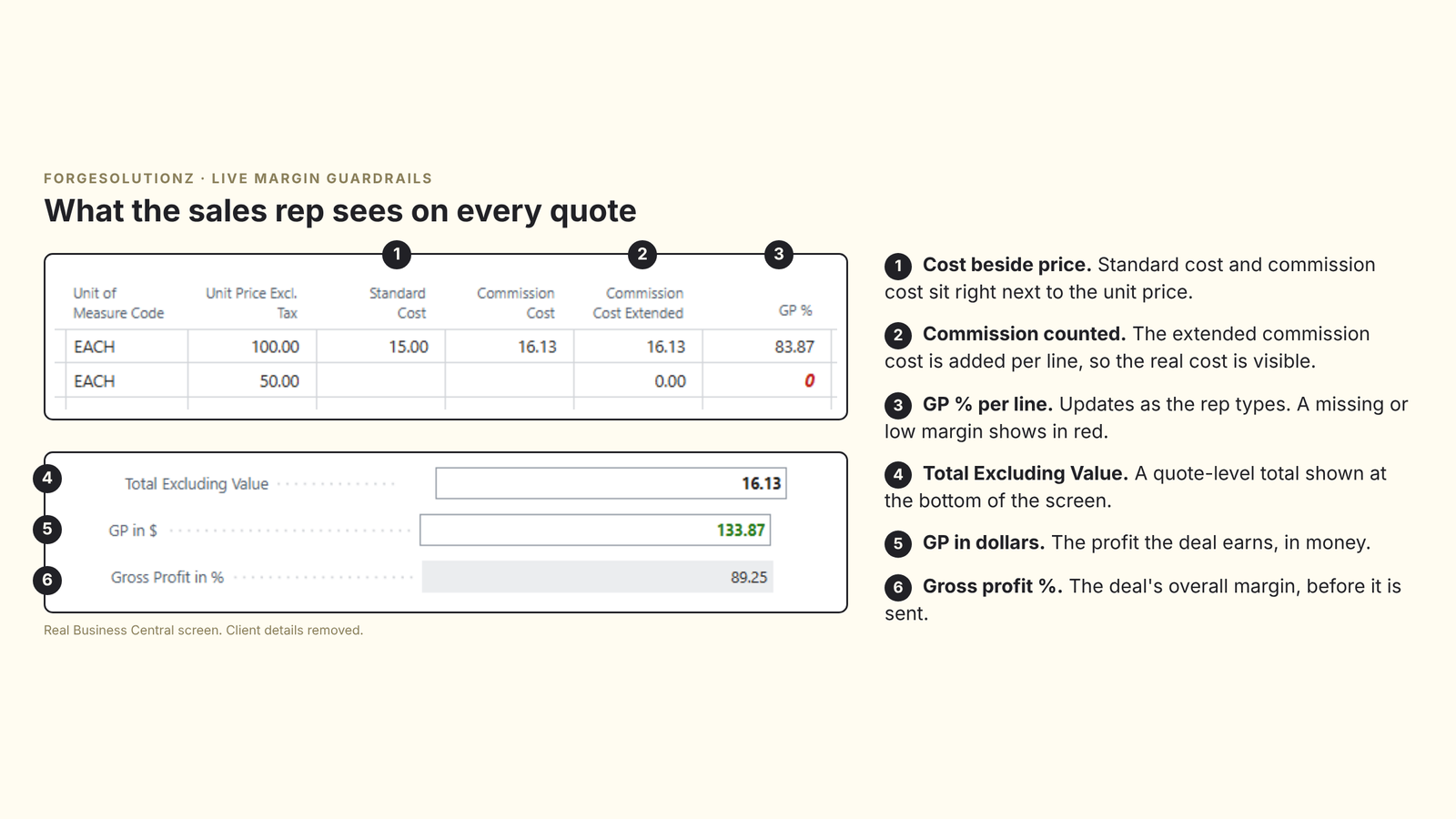
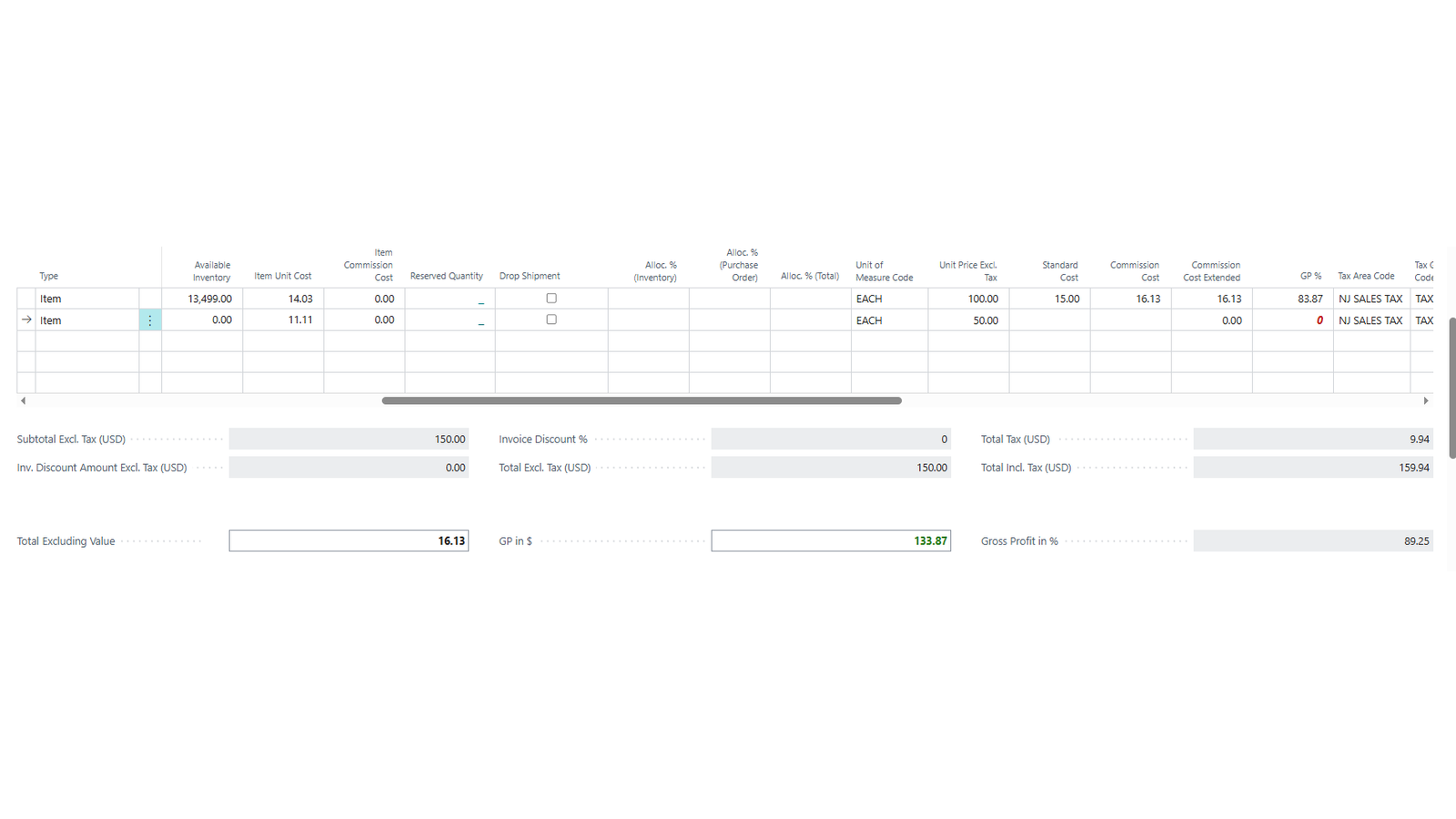
Here is how it looks on a real Business Central quote. Standard cost, commission cost and the gross profit percentage sit in the same row as the unit price, and the totals at the bottom show the margin for the whole deal.
The real quote screen explained in six points.The full quote screen in Business Central. Client details removed.
04 — Before/after
A day in the life: before and after
Before. A customer asks for a better price. The rep drops the unit price on a line, closes the deal and moves on. Nobody sees that the line now earns almost nothing after cost and commission. The order is posted. At month-end, finance spots it in a report.
After. The rep changes the price and the GP % updates on the spot. The line turns red because it is below the threshold. The rep can adjust the price, ask a manager, or decide on purpose to accept the lower margin. The decision is made before the quote is sent, with the facts on screen.
05 — Capabilities
Four capabilities that make the difference
01
Real-time gross profit % with a visual warning
A gross profit column sits next to the price on every quote and order line. It updates as the rep types, and the line turns red the moment margin drops below your threshold. Managers set the floor and the screen flags itself.
02
One field to hold a target margin
A Global GP % field lets the team set a target margin once and apply it across every line on a quote or order in a single action. Every line recalculates to hit the target, so nobody has to rebuild an order line by line.
03
Costs that come from the item card
Cost fields sync automatically from the item card, so there is no manual entry and no risk of a rep working from an old number.
04
Margin that follows the deal to the invoice
Margin data carries through to the posted invoice, so reporting is clean and finance no longer needs a side spreadsheet to reconcile commissions with the books.
In practice: a sales manager wants every line on a large equipment order to earn at least a set margin. She enters the target in one field, applies it, and the whole order recalculates. A quick glance shows any lines that still sit below the floor.
06 — Before/after
Before and after at a glance
01Seeing the effect of a discount. Before: invisible until finance reports. After: live on the line as it is typed.
02Spotting a low-margin line. Before: found weeks later. After: turns red immediately.
03Holding a target margin on an order. Before: change each line by hand. After: one field, one action.
04Working with costs. Before: manual or outdated figures. After: synced from the item card.
05Commission. Before: calculated in a side spreadsheet. After: visible on the line and carried to the invoice.
07 — Results
The results
Real client numbers for this engagement will be added here once a full reporting cycle is complete. The measures we're tracking: average gross margin, the rate of orders posted below the margin floor, how long it takes to spot a problem deal, hours saved on commission reconciliation, and quote turnaround time for large multi-line quotes.
08 — Who benefits
Who benefits from this?
01Sales reps and sales managers who need to price with confidence
02Commission-based sales teams who want commission cost visible on every line
03Finance and margin governance teams who want problems caught before posting
04Equipment and industrial dealers, and any business that discounts where a few thin deals can wipe out profit
09 — Takeaways
Key takeaways
01Margin is only useful if it is visible when the price is set.
02Finding a bad deal after posting is reporting. Preventing it means acting before the quote is sent.
03A visual warning and a one-field target margin are small changes with a big effect.
04Cost data pulled straight from the item card keeps everyone working from the same numbers.
05Keeping margin on the posted invoice makes reporting and commission checks clean.
10 — FAQ
Common questions
01Where does the cost come from? Cost fields sync automatically from the item card, so reps do not type costs by hand.
02What turns a line red? The line turns red when its gross profit % drops below the threshold you set.
03What does the Global GP % field do? It lets you hold one target margin across a whole quote or order. One field, one action, and every line recalculates to hit the target.
04Does the margin show up on the posted invoice? Yes. Margin data carries through to the posted invoice for clean reporting.
05Who should be able to see cost and margin? Cost and margin are sensitive. Your consultants can advise how to control who sees them, based on how your team works.
06Is this only for large sales teams? No. Any business that discounts or pays commission can lose profit to a few unseen thin-margin deals, whatever its size.
07Can the threshold and screens be adapted to us? Yes. The threshold and the way margin is shown can be tailored to your business. A short review can scope it.
11 — Check
Could your team use the same guardrails? A 2-minute check
If you tick two or more, this customization will likely pay for itself:
01Reps discount without seeing the effect on profit
02You find unprofitable orders only after the invoice is posted
03Commission is calculated in a spreadsheet that does not match the books
04Large orders take a long time to reprice line by line
05Managers have no quick way to enforce a minimum margin
Want a result like this one?
Thirty minutes with a senior engineer. Bring the system you are stuck on and leave with a written summary of your options.