Stop Opening Customer Cards: How Collection Notes on the Customer List Made Follow-Ups Faster
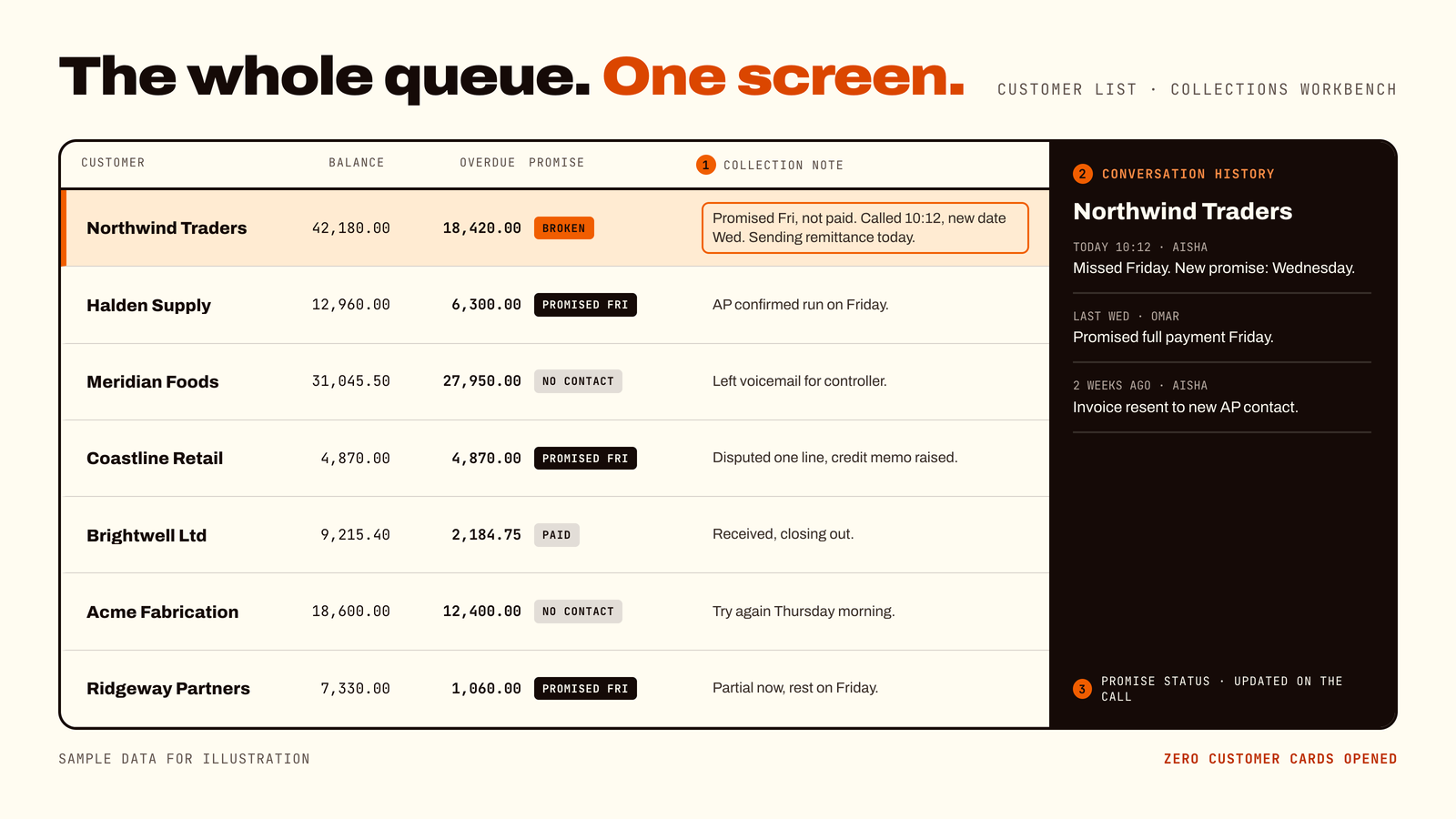
Business Central's Customer List shows balances, but not the story behind them. Collectors had to open customer cards and dig through ledger entries to find out who was called, what was promised and what was said last week. ForgeSolutionz added collection notes and a conversation history panel straight onto the Customer List. Now the whole collections queue can be worked from one screen.
01 — Challenge
The challenge: the numbers were there, the context was not
Every day, collections teams call customers about overdue invoices. In standard Business Central, the Customer List shows basic balance figures. That tells you who owes money. It does not tell you what happened the last time someone called. So collectors had to:
01Open each customer card just to see recent notes.
02Dig into detailed ledger entries to find out whether a payment date had been promised.
03Switch between screens while the customer was waiting on the phone.
04Keep side notes in spreadsheets or on paper, where colleagues could not see them.
None of this was a people problem. The team was doing the right work. The system was simply making a simple job slower than it needed to be.
Why this matters for any business: any company that sells on credit has the same pattern, whether it has two collectors or twenty. Every extra click during a follow-up call costs time. Every missing note risks calling a customer twice, forgetting a promise or chasing someone who already paid. Slow, disconnected collections mean cash arrives later.
02 — Goal
The goal: work the whole queue from one list
The brief was simple. Make the Customer List the place where collections actually happen. In plain terms:
01See balances, overdue amounts and call context together.
02Type a note while still on the phone, without opening anything else.
03See earlier conversations the moment a customer is highlighted.
04Keep every note attached to the customer record, so the whole team can see it.
03 — Solution
The solution: an interactive collections workbench
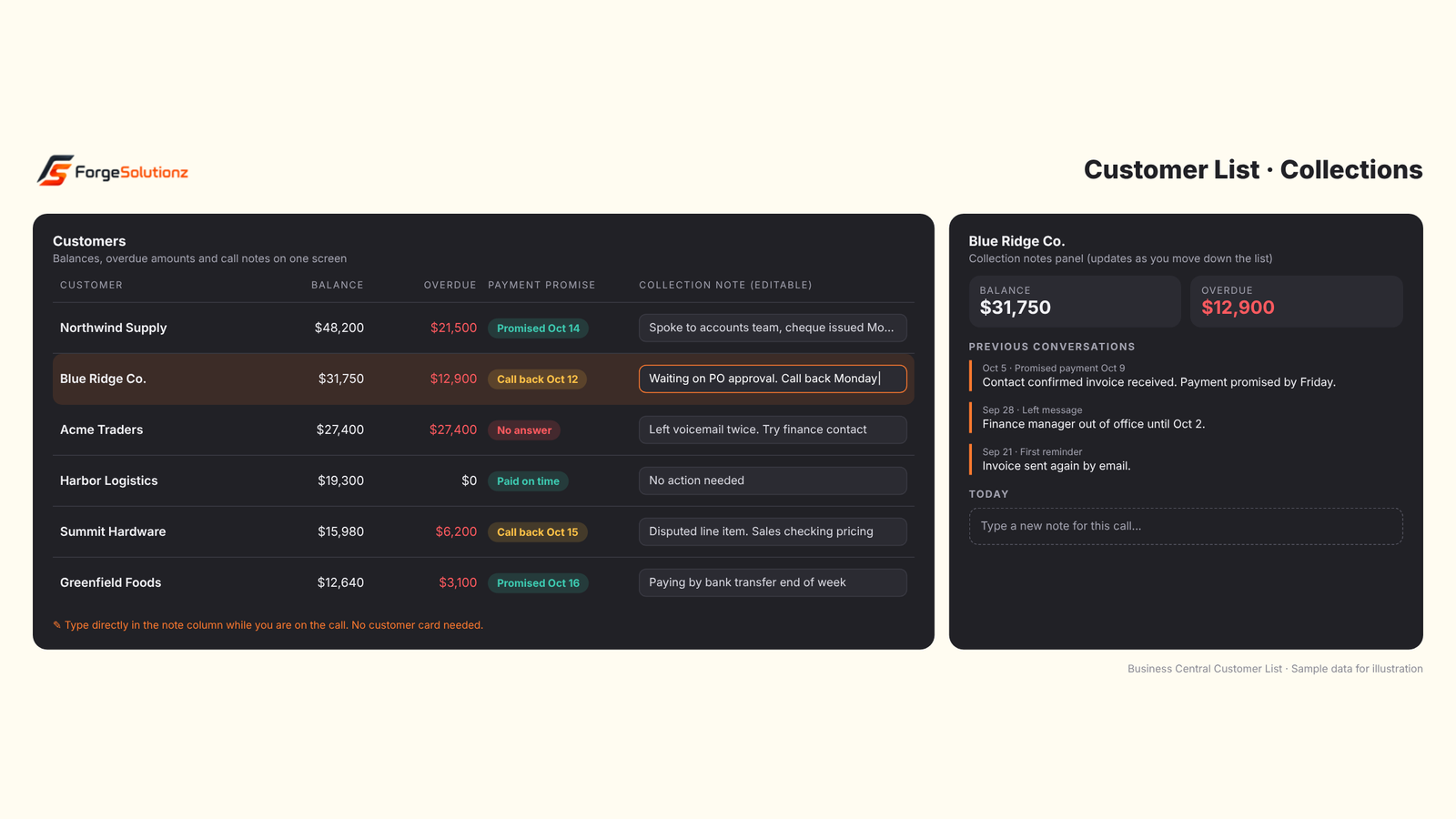
ForgeSolutionz built an extension that turns the Customer List into a collections workbench. It adds two things to a screen the team already knows:
01An editable collection note on every row. Collectors type notes straight into the list while speaking to the client.
02A conversation panel beside the list. Highlight any customer and their previous notes and payment promises appear instantly.
The Customer List as a collections workbench: balances, promises and notes together. Sample data for illustration.
04 — Before/after
A day in the life: before and after
Before. A collector sees a customer with an overdue balance. She opens the customer card, scrolls to find the last note, checks the ledger entries for a payment promise, then returns to the list. Then she repeats this for the next customer. Calls are interrupted by clicking.
After. She highlights the customer. Past conversations appear beside the list. She sees that the customer promised to pay on Friday and has not. She calls, types the new update directly into the note column, and moves to the next row.
05 — Capabilities
Four capabilities that changed the routine
01
Inline collection notes
Notes are typed directly into the Customer List grid. There is no need to open a card, so the conversation keeps its flow.
02
Instant history for every customer
Previous conversation details show up as soon as a customer row is highlighted. Nobody has to ask a colleague what was said last week.
03
Promised payment statuses, updated on the spot
Collectors can update the status of a promised payment as soon as they learn something new. The list always reflects the latest position.
04
Everything on one screen
Customer balances, aged receivables and call notes sit together. The team can review the whole queue without opening a single Customer Card.
In practice: a supervisor wants to know which overdue customers have no follow-up this week. Instead of asking each collector, she scans the list and sees the latest note on every row.
06 — Before/after
Before and after at a glance
01Seeing the last conversation. Before: open the customer card. After: highlight the row.
02Recording a call. Before: switch screens or write it elsewhere. After: type it into the list.
03Checking a promised payment. Before: dig through ledger entries. After: visible beside the customer.
04Team visibility. Before: notes scattered in spreadsheets. After: notes attached to the customer record for everyone.
05Reviewing the queue. Before: open customers one by one. After: scan one list.
07 — Results
The results
Real client numbers for this engagement will be added here once a full reporting cycle is complete. The measures we're tracking: time per follow-up call, how many customers a collector can work through per day, average days to collect, the rate of missed or forgotten promises, and how long it takes a supervisor to review the full queue.
08 — Who benefits
Who benefits from this?
01Accounts receivable specialists and collections clerks who make daily follow-up calls
02Credit managers and AR supervisors who need to see the whole queue and what was promised
03Finance controllers who manage the cash collection cycle
04Any team that wants a simple, list-based collections routine
09 — Takeaways
Key takeaways
01Balances tell you who owes money. Notes tell you what to do about it.
02Every screen switch during a call costs time and breaks the conversation.
03Notes attached to the customer record mean the whole team stays in sync.
04A small change to a screen your team already uses is easier to adopt than a new tool.
10 — FAQ
Common questions
01Where are the collection notes saved? Notes stay attached to the Customer record in Business Central, so they are available for quick reporting and team visibility.
02Do my collectors need to learn a new system? No. They keep working on the Customer List they already use. The note field and the history panel are added to it.
03Can several people see the same notes? Yes. Because notes live on the customer record, colleagues and supervisors can see the same history.
04Is this only for large AR teams? No. Even a one-person finance team benefits from not having to remember or re-find what was said on the last call.
05Can it be adapted to our process? Yes. Your consultants can tailor the fields and statuses to how your team works. Ask for a short review to scope it.
06How long does it take to set up? It depends on how much you want to customize. An initial review can give you a clear plan and timeline.
11 — Check
Could your collections team use the same shortcut? A 2-minute check
If you tick two or more, this enhancement will likely pay for itself:
01My collectors open customer cards just to read the last note
02Call notes live in spreadsheets, emails or notebooks
03Promised payment dates get forgotten or are hard to find
04A supervisor cannot quickly see who has been called this week
05Overdue invoices keep taking longer to collect than they should
Want a result like this one?
Thirty minutes with a senior engineer. Bring the system you are stuck on and leave with a written summary of your options.