Auto Vendor Cost Sync for Business Central: One Trusted Item Cost, Updated the Moment Your Vendor Changes It
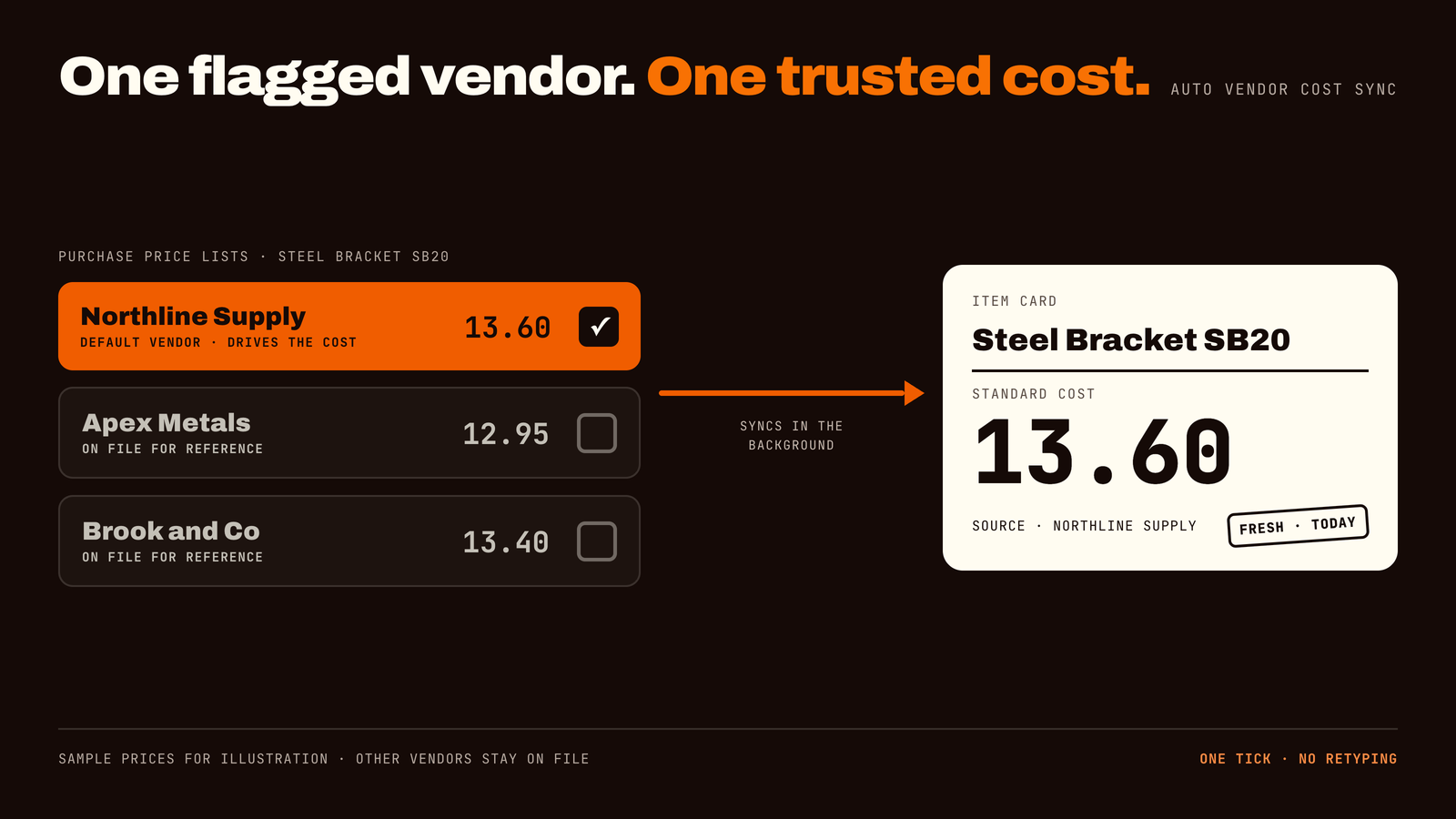
If you buy the same item from more than one supplier, someone has to decide which price is "the" cost, and someone has to remember to type it in. Auto Vendor Cost Sync does both jobs for you. Mark one vendor's price as the default, and the item's standard cost follows it automatically, in the background, every time that price changes.
01 — At a glance
At a glance
01Solution: Auto Vendor Cost Sync (ForgeSolutionz)
02Platform: Microsoft Dynamics 365 Business Central
03Built for: purchasing and procurement teams, controllers, and any business that buys the same item from several vendors
04The problem: an item's standard cost goes out of date whenever a vendor's price changes and nobody re-keys it
05The fix: one vendor's price list line is flagged as the default. Its price updates the item's standard cost automatically
06What your team does: tick one box. Everything else runs in the background
02 — Problem
The problem: a cost nobody is sure about
Standard cost is the one number in your system that everyone trusts and almost nobody updates. It feeds sell prices, margins, stock value and reports. When it goes stale, all of those quietly go stale with it.
It usually happens like this:
01You buy the same item from two or three suppliers, and each has its own price list.
02One supplier raises or lowers a price. A buyer updates that vendor's price list correctly.
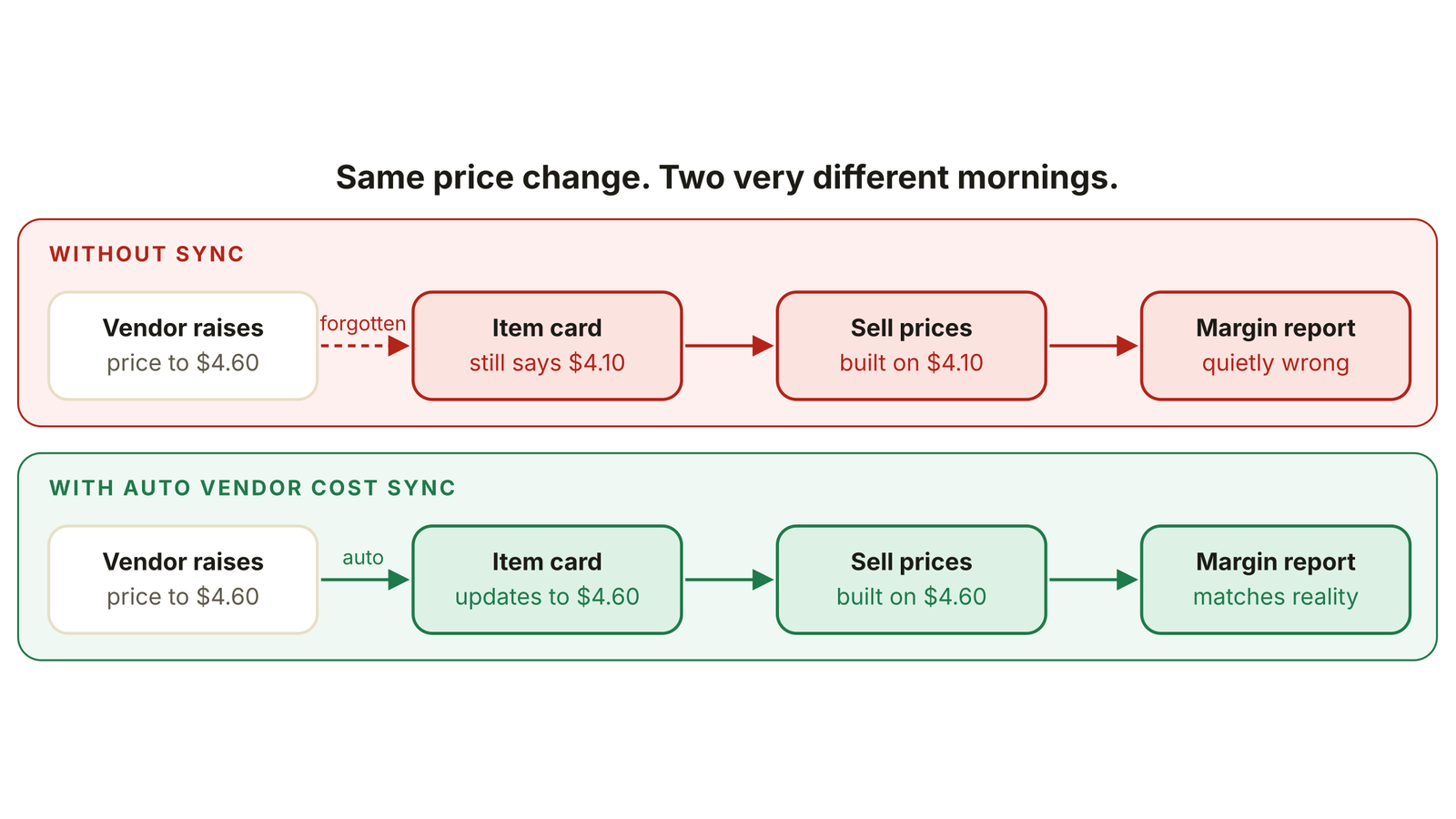
03The item's standard cost stays exactly where it was, because it is a separate field that needs a second, manual edit.
04Weeks later, sell prices and margin reports are built on a number that is no longer true, and nobody can say which vendor the cost was supposed to come from.
“Your item cost is like a milk carton with the date written in marker. It looks official. It is also, by now, a little off.”
This happens in every kind of business: a distributor with thousands of items, a manufacturer buying raw materials, a retailer with seasonal lines, a clinic ordering supplies. It does not come from careless people. It comes from a process that depends on someone remembering.
The same price change, with and without sync. Without it, one forgotten edit spreads into sell prices and reports. Sample numbers for illustration.
03 — Solution
The fix: pick one vendor, then let it run
Auto Vendor Cost Sync adds a simple idea to your purchase price lists: one line per item can be marked as the Default Vendor. That line becomes the single source of truth for the item's cost.
From then on, the steps are automatic:
01Flag it. In the vendor's price list, tick Default Vendor on the line for the item.
02Change a price. Whenever someone updates that line, nothing else is asked of them.
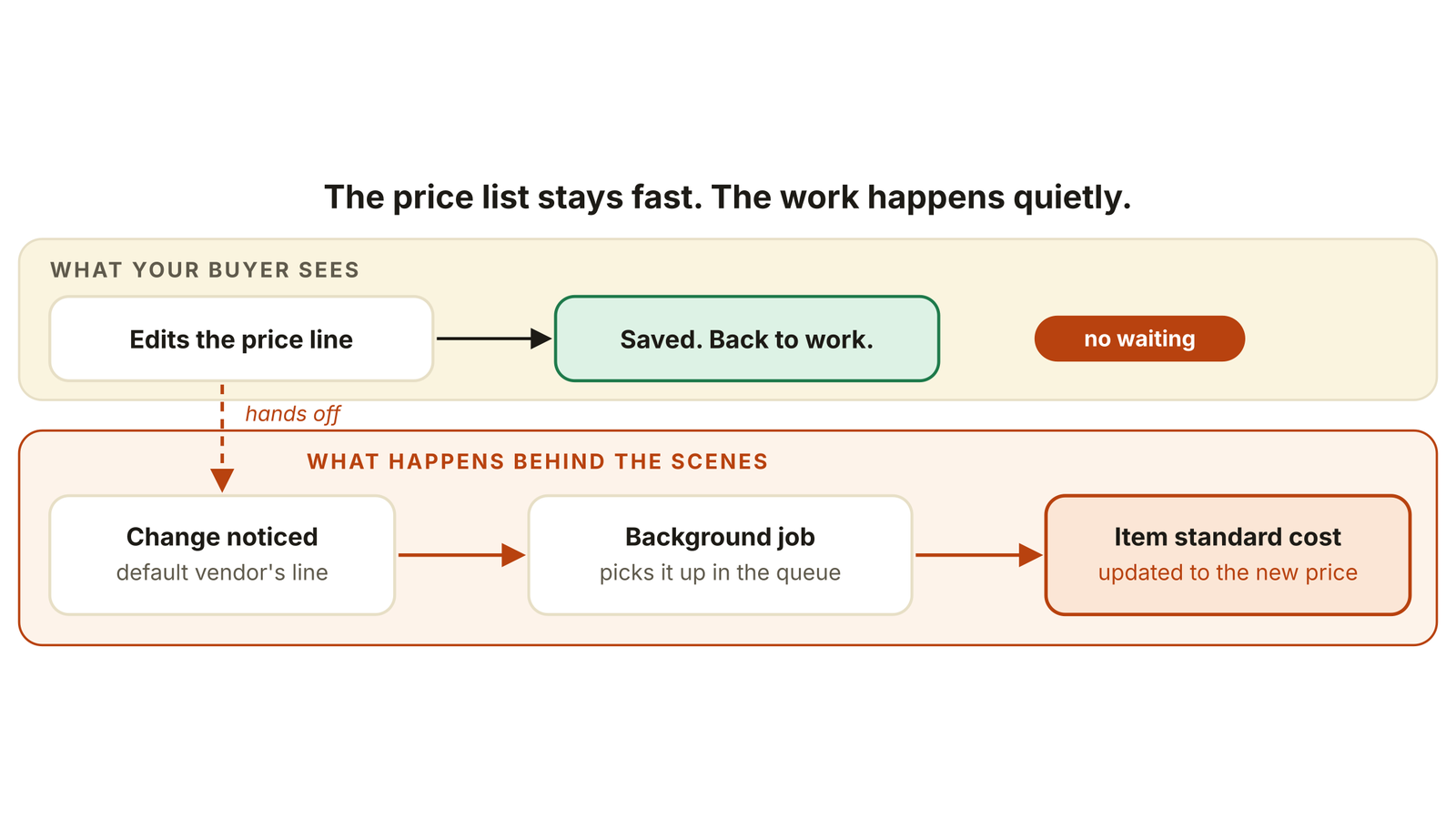
03Sync in the background. The module notices the change and updates the item's standard cost behind the scenes.
04Carry on. The person editing the price list never waits for a screen to lock or a progress bar to finish.
The buyer saves and moves on. The cost update happens in the background, so the price list never slows down.
04 — Features
Key features, in plain language
01One-click default vendor flag: choose which supplier drives the cost with a single tick per item. No setup project, no spreadsheet of rules.
02Automatic background updates: costs update without locking screens or slowing the person editing prices. Your team keeps working.
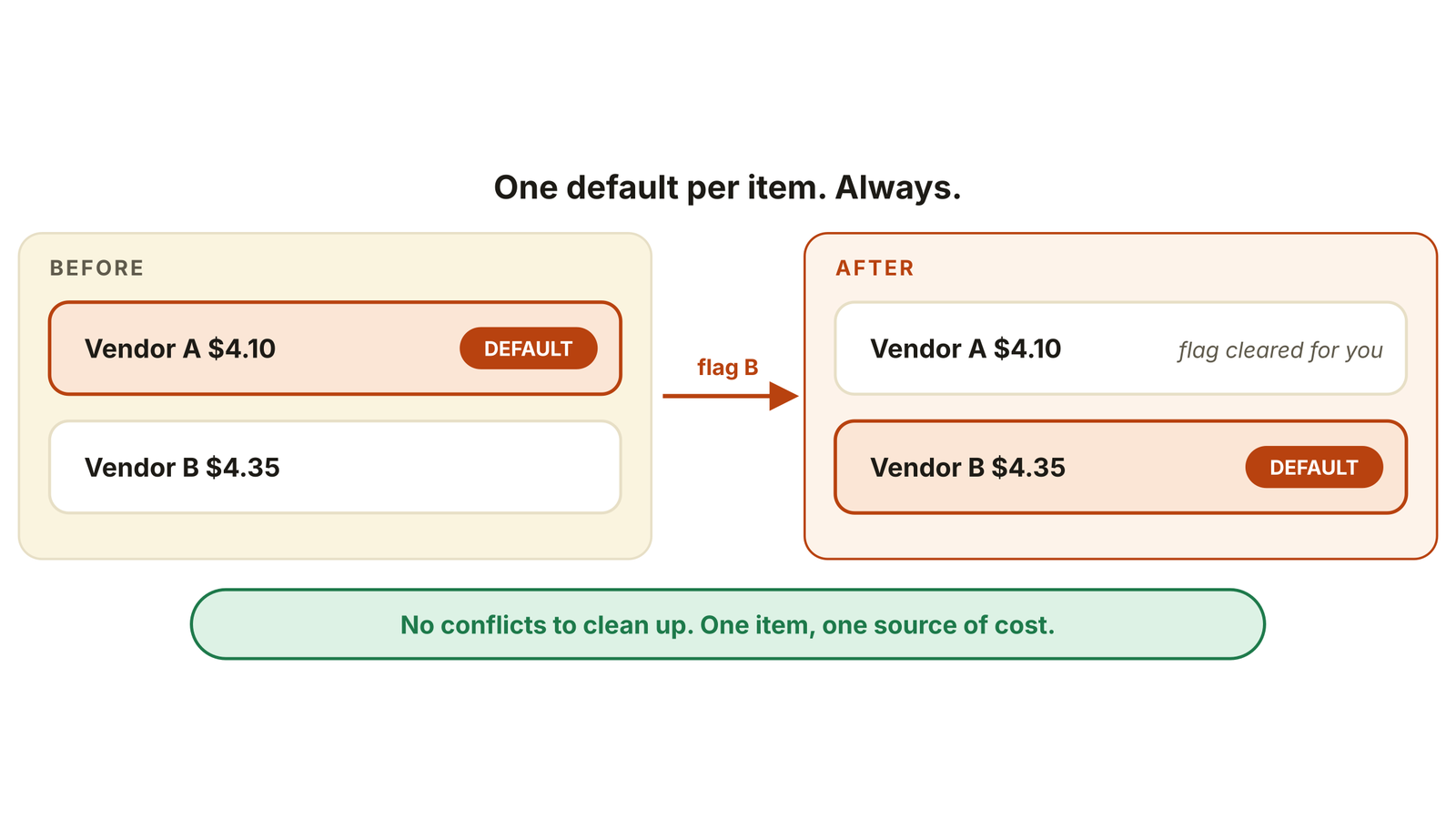
03Only one default per item, always: flag a second vendor and the first flag is cleared for you. No conflicts to find, no two vendors fighting over the same cost.
04Works with direct unit cost or list price: whichever price field your team fills in on the price list line, the module can use it. A missing value in one does not leave you with no cost.
Flag a new default vendor and the old flag clears itself, so an item always has exactly one source of cost.
05 — Gains
What your business gains
01A cost you can defend. Everyone can see which vendor sets the cost, and why.
02Margins you can trust. Sell prices and reports start from a current number, not last quarter's.
03Hours back every month. No more re-keying costs item by item after each price change.
04Fewer awkward meetings. "Which vendor is this based on?" has a one-word answer.
05Room to grow. Add vendors and items without adding admin. The rule stays the same.
06Less risk. One fewer manual step that can be forgotten, skipped or done twice.
06 — Who it's for
Who it is built for
The module works for any business that buys the same items from more than one supplier, whatever its size or industry:
01Purchasing and procurement teams who maintain vendor price lists and want one less thing to update.
02Controllers and finance leads who need standard cost to be accurate for margins, stock value and reporting.
03Distributors, retailers and ecommerce sellers with large catalogs and several suppliers per product.
04Manufacturers and construction firms buying materials whose prices move often.
05Healthcare, hospitality and service businesses that reorder the same supplies from preferred vendors.
07 — Scenario
A realistic scenario
Illustrative example of a common pattern. It is not a named client, and the numbers are samples.
A growing wholesaler buys one fast-moving item from three suppliers. Each quarter, the preferred supplier updates its price. The buyer dutifully updates the purchase price list, but the item card is a separate step and gets skipped in busy weeks.
Three months later, the sales manager notices that margin on the item looks healthier than the supplier invoices suggest. Finance traces it back to a cost that was never refreshed. Nobody did anything wrong, and yet the quarter's numbers were off.
With the preferred supplier flagged as the Default Vendor, the next price change updates the item cost on its own. The buyer's routine does not change. The margin report simply stops drifting.
08 — Get started
How we get you started
01Free consultation. Thirty minutes with a senior engineer to understand how you buy, cost and price items.
02Fit check. We confirm the module suits your setup and which items and vendors to start with.
03Install and test. We set it up in a safe test environment first and check results with real items.
04Go live and hand over. Your team learns the one-click flag, and we are there if anything needs tuning.
09 — FAQ
Frequently asked questions
01What is Auto Vendor Cost Sync? A Business Central module that updates an item's standard cost automatically from the price of the vendor you flag as the default for that item.
02Who is it for? Any business that buys the same item from more than one vendor, including distributors, manufacturers, retailers, construction firms and service businesses of any size.
03Will it slow down my team? No. Updates run in the background, so the person editing the price list is never kept waiting by a locked screen.
04What if two vendors are flagged as default? It cannot happen. Only one default vendor is active per item, and flagging a new one clears the old flag automatically.
05What happens to the other vendors' prices? They stay on your price lists as usual. Only the vendor flagged as the default drives the item's standard cost.
06Does it use direct unit cost or list price? It works with either, so a price is picked up whichever field your team fills in on the price list line.
07How do we get started? Book a free 30-minute consultation. We review how you buy and cost items and tell you honestly whether the module fits.
10 — Check
Your 2-minute check
Tick what sounds like you. Two or more means this module is likely to pay for itself in saved time and cleaner margins:
01You buy the same items from more than one vendor
02Item costs are updated by hand after price list changes
03Nobody can say for certain which vendor an item's cost is based on
04Margin reports and supplier invoices do not quite agree
05Price list updates are slow, or people avoid doing them
Want a result like this one?
Thirty minutes with a senior engineer. Bring the system you are stuck on and leave with a written summary of your options.